Article schema is a form of structured data that helps search engines understand your blog posts as articles. It clarifies who wrote the post, when it was published, what it is about, and which page it belongs to. While it does not change the appearance of your blog, it improves how search engines interpret your content and can support richer search results.
In WordPress, the great thing is that you don’t have to manually edit each post. With the right setup, schema can be applied automatically across your entire blog.
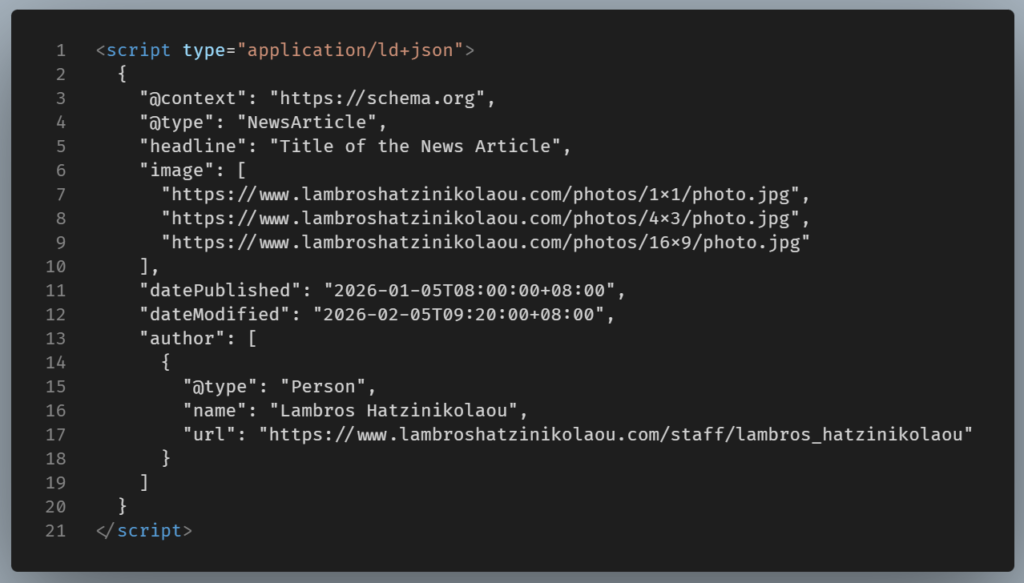
The setup for applying Schema on a WordPress blog
Step 1: Choose How You Will Add Schema
Firstly, you must decide how you want to implement Article schema. Most users choose one of these options:
- An SEO plugin that adds schema automatically
- A small custom snippet added to the theme
Plugins are faster to set up. Custom code, on the other hand, gives more control. Both approaches work if implemented correctly.
Step 2 Prepare Your Blog Content
Schema depends on consistent post data. Make sure your blog posts include:
- A clear title used as the main heading
- An author name assigned to each post
- A publish date and updated date
- A featured image when possible
These details are automatically integrated into the schema, so it’s important to keep them accurate.
Step 3 Add Article Schema Automatically
If you use a plugin, enable article or blog post schema in the settings. Most plugins detect posts and output JSON-LD without extra work.
If you prefer code, you can add a small function that runs only on single post pages. It collects post data such as title, excerpt, author, and dates, then outputs JSON-LD in the page head. Once added, it applies to every post now and in the future.
This approach scales well because one setup supports dozens of articles.
Step 4 Test Your Pages
After implementation, test several posts using a structured data testing tool. Focus on:
- Missing fields such as images or publisher details
- Mismatches between visible content and schema values
- Errors caused by multiple schema sources
Tackling small issues early on, can prevent significant ones later on.
Step 5 Keep It Consistent Over Time
Schema works best when it stays accurate. Schema depends on content structure. When content structure changes, schema can drift.
Updating Posts
When you edit a post, you may unintentionally affect fields used by schema:
- Editing the title can create a mismatch between the
<h1>and the schema headline - Removing or shortening an excerpt can leave the description field empty
- Removing a featured image may cause the image property to disappear or fall back to a default
The page still looks fine to readers, but search engines may now see incomplete or inconsistent structured data.
That’s why it’s good practice to spot-check a few updated posts after major edits.
Changing Authors
If you rename an author or switch from multiple authors to a single brand author, the schema output may still reference the old author name or an author profile that no longer exists.
This can break the author property in Article schema, which search engines expect to be accurate and visible on the page.
Switching Themes
Theme changes are the most common cause of broken schema.
A new theme may remove or relocate the post title markup, change how featured images are loaded, or alter how excerpts are handled.
This can result in duplicate Article schema on the same page or schema values that no longer match visible content.
Because schema runs quietly in the background, these issues can go unnoticed unless you test.
A quick check keeps everything aligned
You don’t need to audit every post. Pick 3–5 representative articles
If those look good, the rest of the site usually is too.
NOTE: Regarding Plugins, avoid running multiple ones that output the same schema type, as this can confuse search engines.
Final Thoughts
When it comes to implementing Article schema in WordPress, the focus should be less on the technical aspects and more on ensuring consistency. Once set up, Article schema quietly supports every article you publish. With clean post data and a single reliable schema source, your blog becomes easier for search engines to understand and index correctly.