For any website owner, discovering a hacked WordPress site is a true nightmare. Maybe your website is redirecting to spammy sites, or it’s down completely. Or maybe you see unfamiliar users or code in your dashboard. Any of these is a clear indicator that your site has been compromised.
Here’s how to fix your WordPress site if it’s been hacked.
Don’t panic. You can recover your website, but you need to act fast and methodically.
1. Disconnect Immediately
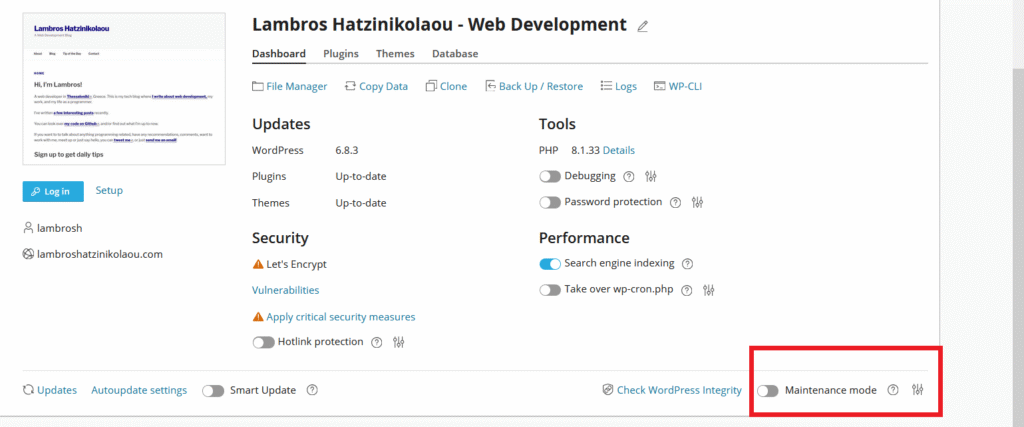
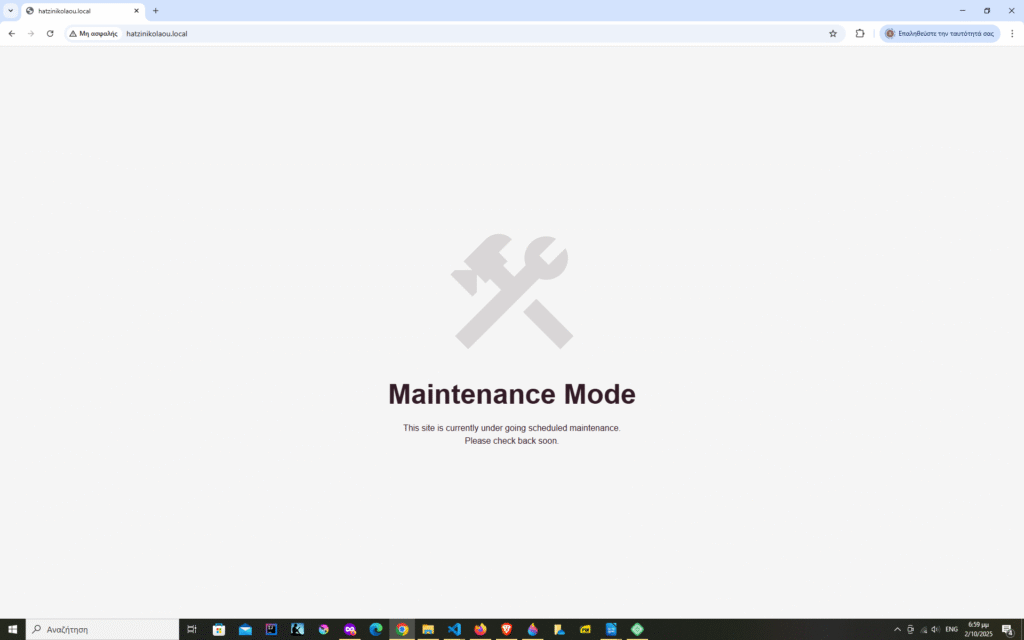
The moment you suspect a breach, take your site offline immediately using maintenance mode.
Attackers should not be allowed to continue their destruction by keeping the site active, and your visitors should not have to see the chaos left behind.
Most hosting providers offer a one-click option for this.
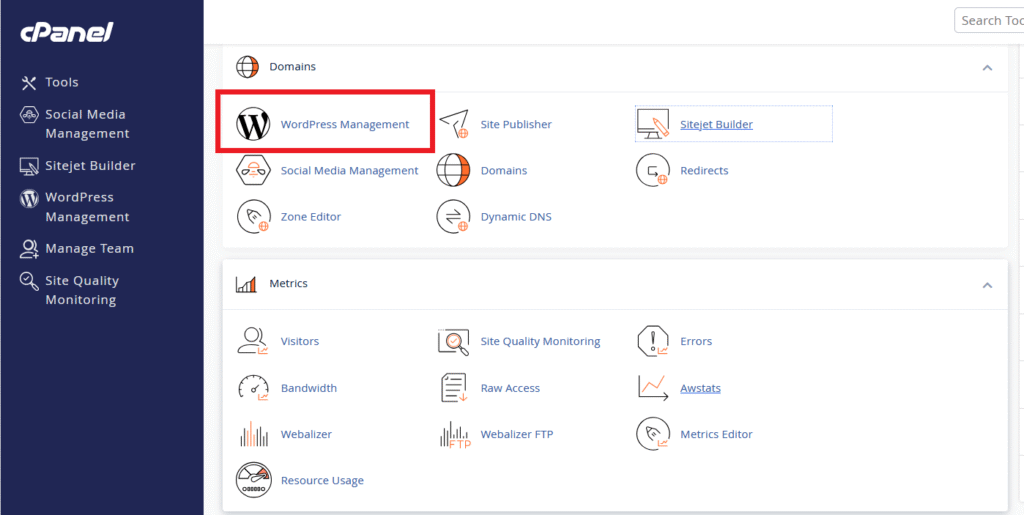
Once you get to the dedicated WordPress Management section on your cPanel, you can put your site in maintenance mode.
Another option is to use a WordPress plugin. There are a lot of options with pre-made templates. Your visitors will feel reassured by the aesthetically pleasing templates and will know you’re in control.
2. Scan for Malware or Suspicious Code
To scan your hacked WordPress site for malware, install a reputable security plugin like Wordfence or Sucuri.
These tools can scan your files and alert you to core files that have been modified, malicious scripts, or suspicious behavior. If you can’t log in, some hosts offer one-click malware scans from their control panel.
Use any of these tools to run a full scan and review the results.
You can also perform manual scans by inspecting your database for suspicious content, checking core files like wp-config.php and .htaccess for code injections, and comparing modified files against a clean WordPress installation or backup.
3. Contact your hosting provider ASAP.
You should immediately contact your web hosting provider, as they are your strongest ally and have the tools and expertise to help you recover from a WordPress hack, especially if you use shared hosting where the breach could have originated from another site on the same server.
They’ve dealt with thousands of hacked sites and can isolate your account, check server logs, and often spot the entry point faster than you can. Some hosts even offer free malware removal as part of their service—worth asking about before you start paying for third-party help.
4. Deal with the Infection
If you’re experienced, you can try to manually remove malicious files. Another option is to use professional help from your host (previous step) or a malware cleanup service like Sucuri or MalCare.
But the harsh truth is that partial cleanups don’t always work. Hackers use backdoors, which are hidden files, to re-enter your system after you’ve apparently fixed it. The most dependable recovery strategy is to use scorched-earth tactics.
Start by backing up your current (compromised) site. You’ll need it to recover your recent content and to understand what went wrong. Then, restore from a clean backup taken before the hack occurred. If you have no backups, you’ll need to reinstall WordPress from scratch, which means downloading fresh copies of core files, themes, and plugins directly from official sources.
5. Harden your site
Once you’ve got clean files in place, change everything that grants access.
Assume every password and access credential has been compromised. Change your WordPress admin password, database password, FTP credentials, and hosting account password.
Use strong passwords: at least 16 characters mixing letters, numbers, and symbols. Password managers like LastPass and 1Password make this painless.
Check your user accounts carefully. Hackers love creating admin accounts with innocent-sounding names like “support” or “admin2” that blend in with legitimate users. Delete anything suspicious, then review the privileges of the remaining accounts. Most accounts don’t need admin access.
6. Be alert
Your site’s recovery doesn’t end when it goes back online. Monitor it closely for the next few weeks, checking for suspicious files, unexpected redirects, or performance issues.
Final Thought
Dealing with a compromised WordPress site is a stressful, but also recoverable situation.
You don’t need to be a cybersecurity expert to respond effectively. You just need a clear plan and the right tools. And the best time to prepare for a hack is always before it happens.