When building a website, you’ll often size things using pixels, percentages, or relative units like em or rem. But there’s another powerful sizing system that directly relates to the user’s screen size. This are viewport units. The most common are vh (viewport height) and vw (viewport width).
Here’s the concetp:
- 1vh equals 1% of the height of the browser’s viewport.
- 1vw equals 1% of the width of the browser’s viewport.
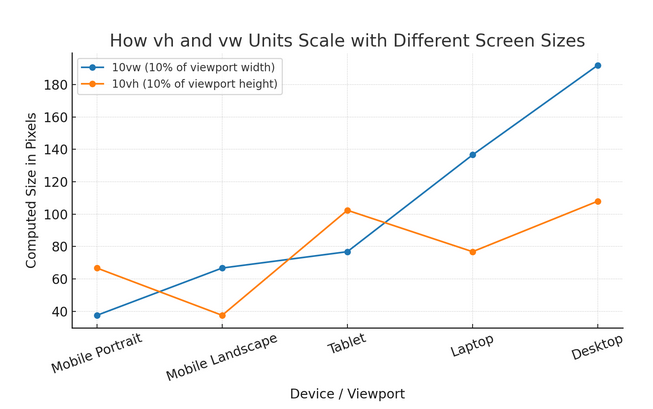
If your screen is 1000px wide, then 1vw is 10px. If the height is 900px, then 1vh is 9px.
Why Developers Love Viewport Units
Viewport units make it effortless to create layouts that adapt exactly to the screen. Want a hero banner that always fills the full height of the screen? Use height: 100vh;. Need a heading that’s always 5% of the screen width? Try font-size: 5vw;.
You’re not guessing how big a user’s screen might be. Your elements scale with it. That’s especially handy for fullscreen layouts, landing pages, and responsive typography.
For example, you might want to use them to create a hero section that always fills the entire screen:
.hero {
  height: 100vh;
  width: 100vw;
}
This CSS ensures that the hero section will always be exactly the size of the viewport, regardless of the device’s screen size.
The Catch (and How to Handle It)
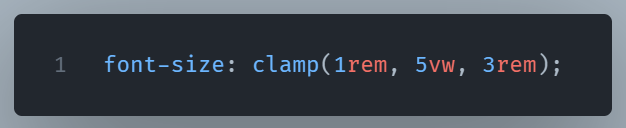
Viewport units aren’t perfect. On mobile browsers, the “viewport” can shift when the address bar appears or disappears, meaning your perfectly calculated 100vh section might jump unexpectedly. Also, text sized in vw can become unreadably small on tiny screens, or gigantic on ultra-wide monitors.
The workaround? Combine viewport units with other constraints.
For example:
When to Reach for vh and vw
Use viewport units when:
- Designing fullscreen hero sections or slides
- Creating responsive typography that scales naturally
- Setting backgrounds or videos to fill the screen exactly
- Aligning elements dynamically to the viewport edge without media queries
To summarize, vh and vw provide fine-grained control for adaptable designs.