As a WordPress theme grows, template files can become large and difficult to manage. A typical index.php, single.php, or archive.php file may contain hundreds of lines of HTML and PHP. Over time, finding and updating specific sections becomes harder.
This is where Template Parts help.
A Template Part is a reusable piece of code that lives in its own file. Instead of placing all markup inside one large template, you can split common sections into smaller, focused files and include them where needed.
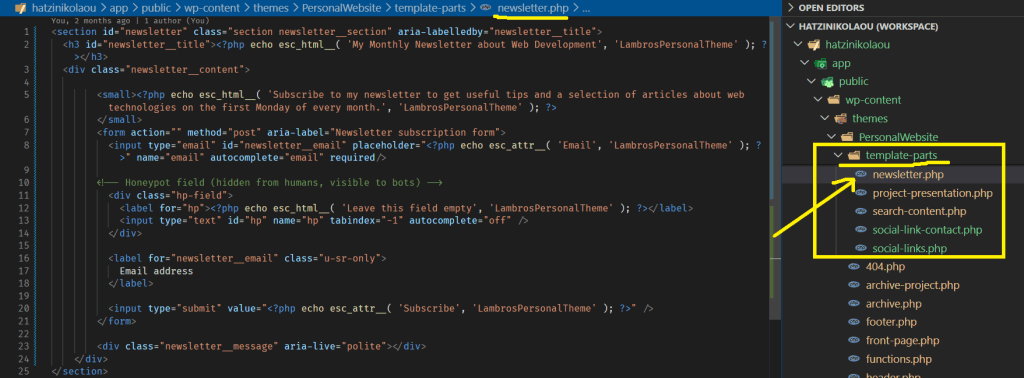
The above template-part can be used in any template you find fit.
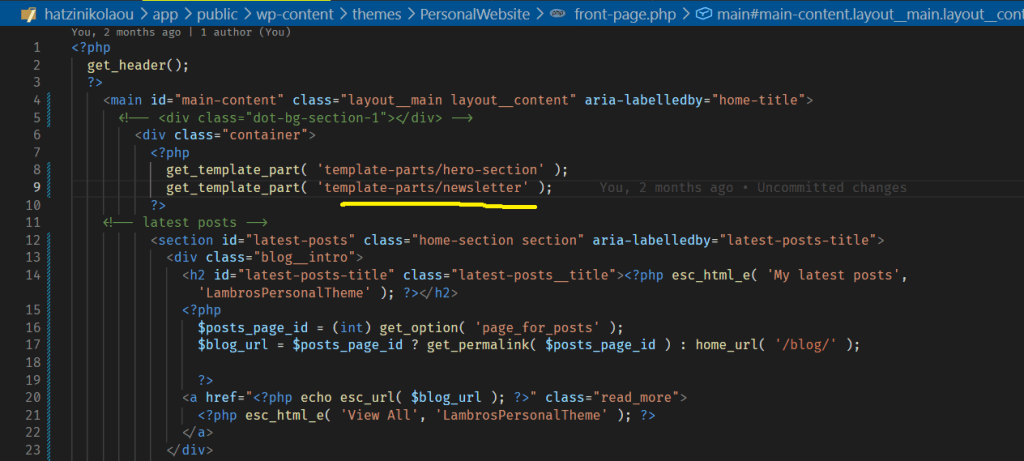
Breaking Large Templates into Smaller Pieces
Imagine your blog displays each post using the same markup on several pages. You could place that code directly inside every template, but doing so creates duplication.
Instead, you might create: template-parts/content.php
Then load it with: get_template_part( 'template-parts/content' );
WordPress inserts the contents of that file wherever the function is called.
This keeps your templates shorter and easier to read.
Reuse Without Repetition
One of the biggest benefits of Template Parts is reusability.
Suppose your theme displays post excerpts on:
- The blog page
- Category archives
- Search results
Rather than maintaining the same code across multiple files, you can create a single Template Part and reuse it everywhere.
This reusability is very helpful when you need to make a change. Instead of searching through several files, you just edit a single file.
Different Parts for Different Content
Template Parts can also have variations.
For example:
template-parts/content.php
template-parts/content-page.php
template-parts/content-search.php
You can load them like this: get_template_part( 'template-parts/content', 'search' );
WordPress then loads: template-parts/content-search.php
This approach allows each content type to have its own markup while keeping templates organized.
Final Thoughts
Template Parts help reduce duplicate code, and keep template files manageable. While a small theme may work without them, larger themes benefit greatly from that modular structure.
As a general rule, if you find yourself copying the same markup into multiple templates, it is probably a good candidate for a Template Part.