Microdata is a part of the WHATWG HTML specification that dictates how to embed metadata within an existing web page.
It is a valid way to add Schema.org structured data directly into your HTML using attributes like:
itemscopeitemtypeitemprop
Search engines can read Microdata and generate rich results from it.
The advantage of this method is that it directly associates metadata with visible content and is supported by all major search engines.
Let’s see an example.
Review Rich Snippet Using Microdata
Here’s a simple example of Review schema written with Microdata:
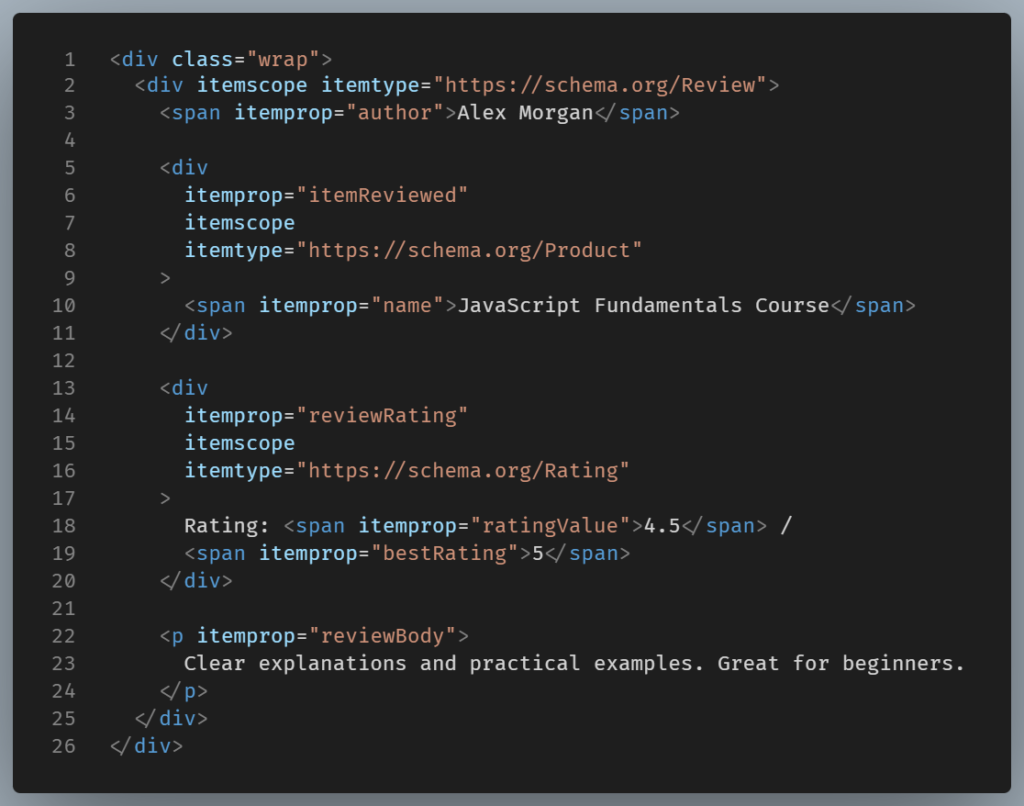
Provided that the same content is visible to users, this markup qualifies for review rich snippets.
How Microdata Works
Microdata embeds structured data inline with HTML content:
- Each attribute describes a piece of information.
- The markup must wrap the visible content.
- Structure must match the actual layout of the page.
This tight coupling is both its strength and its weakness.
What “tight coupling” means in Microdata
When we say Microdata is tightly coupled to HTML, we mean this:
The structured data is embedded directly inside the same HTML elements that users see.
In Microdata, the content and the schema are inseparable. If you move, rename, wrap, or remove HTML elements, you are also changing the structured data.
That tight relationship has one clear strength and several practical weaknesses.
Because Microdata lives inside visible HTML:
- The structured data always matches what users see
- It’s harder to accidentally mark up hidden or fake content
- Search engines can easily verify authenticity
Example:

If the rating changes visually, the structured data must change too.
For very small, static pages, this can feel reassuring.
Why does tight coupling become a weakness
Problems arise as soon as a site grows or changes.
1. Small layout changes can break schema
Suppose a designer wraps text in a <div> for styling.
If that wrapper is removed or moved, you might accidentally:
- Break the nesting
- Detach
itempropfrom itsitemscope - Invalidate the entire schema block
The page still looks fine but your rich snippet eligibility is gone, without notice.
2. HTML refactors become risky
With Microdata:
- Frontend changes affect SEO
- SEO changes affect frontend markup
This creates friction between developers and content editors.
A harmless refactor like changing tags or reordering elements can unintentionally corrupt structured data.
3. Harder to scale across many pages
On a blog with dozens or hundreds of articles every template change must preserve schema integrity and every editor must avoid breaking attributes. In such a case consistency becomes fragile.
4.Debugging is harder
When Microdata breaks:
- The page still renders normally
- There’s no obvious visual error
- You must inspect HTML nesting manually
These are some reasons why Google explicitly recommends JSON-LD over microdata. The former is considered easier to manage and less error-prone.
When Microdata Still Makes Sense
Microdata may be reasonable if you are working with very simple static HTML.
It is also useful when you need schema tightly bound to specific markup or when you are unable to inject JSON-LD due to CMS limitations.
Another usecase is for maintaining legacy pages already using Microdata.
A simple way to remember their difference
- Microdata: “Meaning is glued to the HTML.”
- JSON-LD: “Meaning is described alongside the HTML.”
Coupling with HTML is fine for small projects, but at scale, it may crack.
Conclusion
Microdata still works, but it requires more discipline and makes maintenance risky on modern, dynamic sites. It also makes SEO efficiency dependent on layout decisions, which is not practical.
If you’re starting today or working with WordPress, modern frameworks, or dynamic sites, use JSON-LD since it’s cleaner, safer, and easier to scale.