It’s common for the programs you write to encounter errors. A file may be missing, or a user may enter text where a number is expected, or a number may be divided by zero; you get the picture.
In Python, these events raise exceptions. An exception is a signal that something went wrong during the execution of a program.
If no action is taken, Python stops the program and prints a traceback. That output helps developers debug the issue, but it also ends the program.
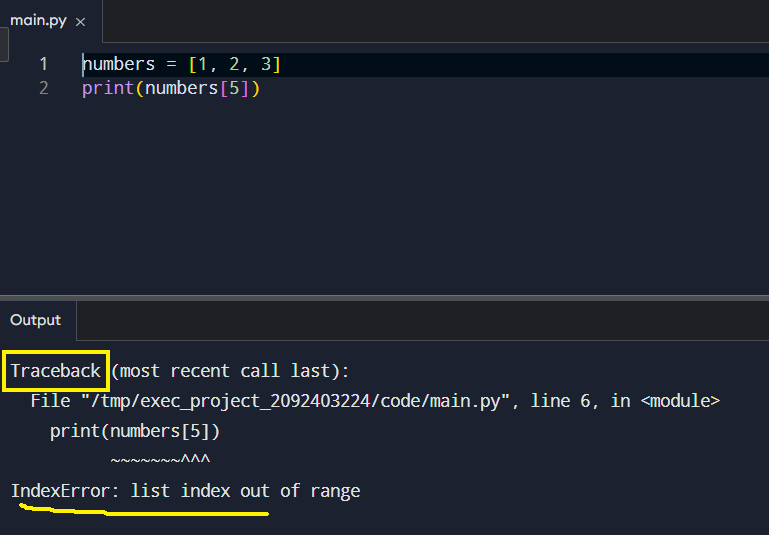
With exception handling, you can intercept that signal and respond in a controlled manner. The try statement is the tool designed for this purpose.
The Basic Try and Except Pattern
Exception handling revolves around two main blocks
The first block contains the code that could potentially fail, and the second block is designed to deal with any failures that arise.

Python first runs the try block. If an error occurs, it searches for a matching except clause. When it finds one, it runs that block instead of crashing.
This structure allows a program to recover and continue running.
Catching Multiple Errors
You can also combine it with multiple error types.
A program may face different types of exceptions. Each one represents a different problem. You can handle them separately.
For example:
Specific handling keeps the code clearer. Each exception explains a distinct issue.
The Role of Finally
Some actions must occur regardless of whether an error occurs or not. Closing files is a common example. Python provides the finally block for this purpose.
The finally block is executed regardless of whether an exception has occurred. It’s particularly useful for clean-up tasks, such as closing files.
Use the exception object
as gives you access to the exception object.
It assigns the caught exception to a variable so you can inspect it or display its message.
This is useful when you want details about the error, not just the fact that it happened.
It does not change how exceptions are caught. It simply lets you work with the error information inside the handler.
Basic syntax:
Why as is helpful
Without as, you only know the type of error.
With as, you gain access to the exception object itself.
Thanks to this, you can react differently based on the details. You can print the message, log it, or inspect attributes.
Regarding the last one, the exception object contains:
- a readable message
- the file name
- the system error code
You can use these values inside your program.
Example with file errors:
Good Practice
Exception handling protects programs from unexpected events. It keeps applications stable and user-friendly. Still, it should not hide real problems. Good practice is simple.
- Catch errors you expect
- Provide clear messages
- Avoid catching everything unless necessary
Conclusion
In short, exceptions are part of normal programming. Python gives developers a structured way to respond when things go wrong, keeping code both safer and easier to maintain.