A permalink (short for permanent link) is the full, unchanging URL that points directly to a specific post, page, or piece of content on your website. It’s called permanent because the goal is stability so that link works today, tomorrow, and years from now.
They differ from dynamic links that show different content based on context, user session, or parameters.
yoursite.com/search?q=wordpress
Or
yoursite.com/page/2
In WordPress, permalinks are more than just addresses. They define how your site’s structure looks to both users and search engines.
A blog post, for example, could have a permalink like this:
https://example.com/2025/10/13/permalinks-explained/By getting your permalinks right from the start, you can save yourself countless headaches down the road.
The Problem with Ugly URLs
By default, WordPress might use something like ?p=123, which isn’t meaningful.
Google can’t determine what your page covers, users can’t remember the link, and when someone shares it on X.com, it looks like random code instead of readable text.
A permalink like yoursite.com/beginner-guide-wordpress instantly communicates what the page contains, while yoursite.com/?p=847 might as well be encrypted.
Changing it to something readable, say /blog/what-are-permalinks/, instantly makes it both human-friendly and search-friendly.
This matters because URLs serve as mini-descriptions of your content.
That readability influences user trust, and even your search engine rankings.
A descriptive slug helps SEO
Search engines read your URLs before they even load your page content. A well-structured permalink tells Google exactly what to expect, which helps your content rank for the right searches. When your URL contains relevant keywords (like “wordpress-permalinks-guide”), it reinforces what your page is about.
Aside from technical SEO gains, clean permalinks improve click-through rates. When someone sees two search results, one with a readable URL and one with numbers and question marks, they’ll click the readable one almost every time.
Customizing Permalinks in WordPress
WordPress offers several permalink structures, each with different strengths. The “Post name” structure (yoursite.com/sample-post) creates the cleanest, most readable URLs and works well for most websites. Your post title becomes your URL, with spaces replaced by hyphens.
Some sites add the category or date to their permalinks, creating structures like yoursite.com/category/post-name or yoursite.com/2024/03/post-name. These make sense for specific use cases—news sites benefit from dates, while large blogs with distinct sections might want category-based URLs. Generally, simple is better, unless a more complex structure is a requirement.
Making Changes Without Breaking Everything
Changing your permalink structure after your site is established breaks every existing link pointing to your content. Bookmarks, social shares, and search results: they’re all gone. This doesn’t mean you’re stuck forever with a bad structure, but it does mean you need redirect rules to send old URLs to their new locations.
Plugins such as Redirection and Yoast SEO automate this, establishing 301 redirects which retain SEO value and prevent errors. If your site is live, changing permalinks requires careful planning and proper redirects.
Setting Up Smart Permalinks from Day One
Access your permalink settings through WordPress’s Settings menu, choose “Post name” for most sites, and save.
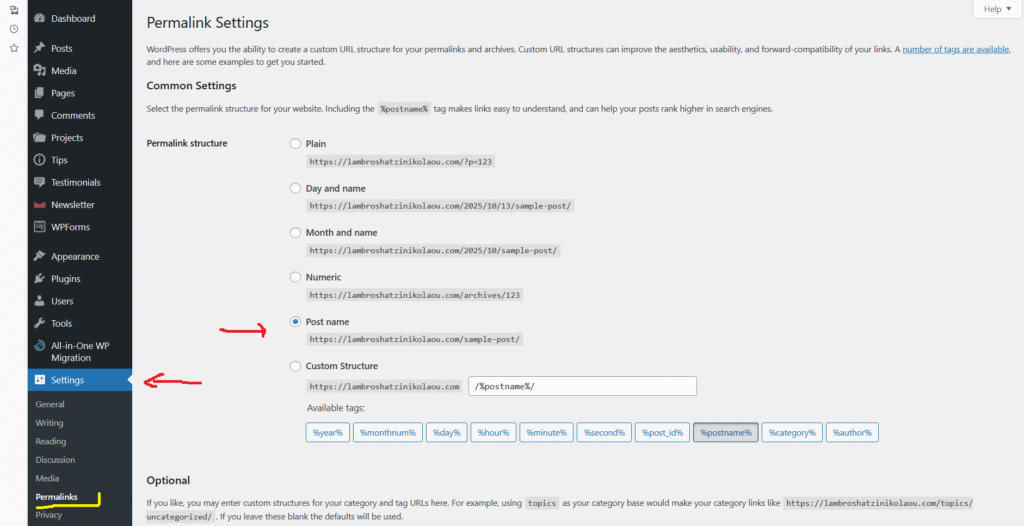
That’s it for basic setup. The real skill lies in crafting individual post slugs (the final part of your URL) that you can edit when creating content.
Your post might be titled “The Ultimate Comprehensive Beginner’s Guide to Understanding WordPress Permalinks,” but your slug should be something concise like “wordpress-permalinks-guide.”
Keep slugs short, descriptive, and focused on your primary keyword. Remove unnecessary words like “the,” “and,” or “ultimate.” Your URL is prime real estate where every character should earn its place.
Final Thought
Permalinks seem like a minor technical detail until you realize they’re the foundation of how people find and share your content. Set them up correctly once, maintain good practices as you create content, and you’ll never have to think about them again. A little planning can make your web presence better.