JavaScript variables act as data containers within your code. You can access and modify these containers and also use them to store data such as numbers or text.
You can use these variables later in your program.
In JavaScript, you can declare a variable with the let keyword.
Here’s an example of how to declare a variable named age using let:
let age;
At this point, the age variable does not have a value assigned to it. In order to assign a value to a variable you will need the assignment operator:
let age = 25;
We call the process of giving a variable a value initialization.
let’s advantage is that it permits reassignment. In programming, reassignment means changing a variable’s stored value.
age = 30;
The variable age now stores the value 30. As age is declared, there’s no need to declare it again, so let is unnecessary.
For reassignment, referencing the variable name is sufficient. Reassignment is useful since it enables you to modify and update the value of a variable during program execution. Updating game points is one such instance.
Variable naming might seem simple, though it has rules and best practices.
A variable should be named to indicate data meaning. For example, instead of using a name like x, a more descriptive name such as age or points makes your code easier to understand.
Variables in JavaScript have to start with either a letter, an underscore, or a dollar sign. They cannot start with a number, though.
Variable names are case-sensitive.
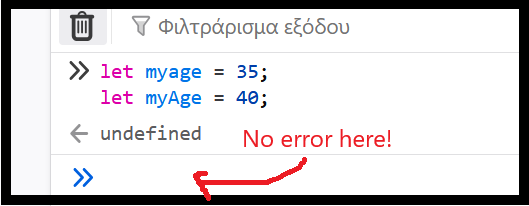
This is why following a consistent naming convention such as camelCase is important. In camelCase, the initial word is lowercase, while others begin with uppercase.
Here’s how you use camelCase variable naming:
let myVariableName = 'name';
You can’t use certain JavaScript keywords as variable names, for example, let, const, function, or return.
Be sure to leave out special characters, like exclamation points (!) or at (@) symbols, in your variable names. Use letters, numbers, underscores, and dollar signs to make variable names more readable.
Following these guidelines will make your code cleaner and easier to manage.