When a user clicks an anchor link that jumps to a section on the page—like #faq or #contact—you can make that section stand out visually. You don’t need JavaScript for this. You can do it with pure CSS, using the :target pseudo-class.
Let’s break it down.
What is :target ?
The :target pseudo-class lets you style an element when its ID matches the fragment in the URL.
For example, say you have a link like this:

And later in your page:

When that link is clicked, the URL updates to include #section2, and now the with id="section2" becomes the target.
You can then style it like so:
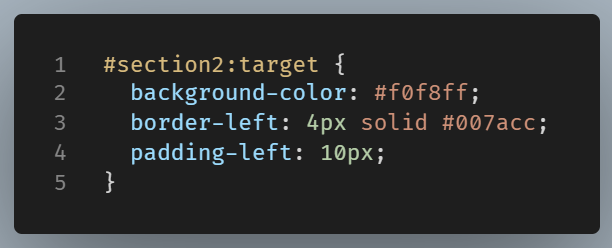
Now, that section gets highlighted when visited. And all that without the need of any JavaScript code.
Why use it?
- It improves user experience by helping users find where they landed.
- It’s great for FAQs, documentation pages, or any long-scroll content.
- It works with browser-native behavior, meaning it’s fast and accessible.
NOTE: since :target only applies while the URL has that specific fragment, the style isn’t permanent. Refreshing or clicking another link removes the effect.Practical uses
Some practical usecases are:
- Highlighting FAQ answers as users click questions
- Creating CSS-only tabbed interfaces
- Styling “Read More” reveal sections using links
A Quick Example in Action:
See the Pen pseudoclass:target by Lambros (@lampxatzi) on CodePen.
Wraping Up
:target is a simple, yet effective tool. It gives your static links a bit more life, allowing elements to visually respond when they’re the focus of navigation. If you’re building pages with internal anchors, it’s a smart way to guide the user’s attention—without writing a single line of JavaScript.