CSS’s pseudo-classes aren’t functions in the programming sense, though they work similarly. They take arguments inside parentheses, which gives you more control over exactly which elements you’re targeting.
Instead of just saying “style every first child”, you can, with the help of pseudo-classes, be more specific. You can “style every odd-numbered paragraph” or “select every link that’s not in the footer.”
A Brief Introduction
The “functional” part means these pseudo-classes accept parameters. This is what makes them different from simpler pseudo-classes like :hover or :first-child. Think of them as selectors with built-in decision-making.
Some of the most common include:
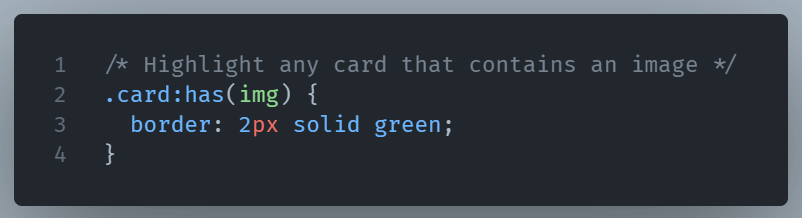
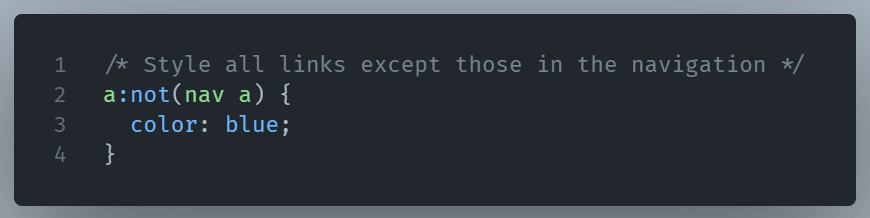
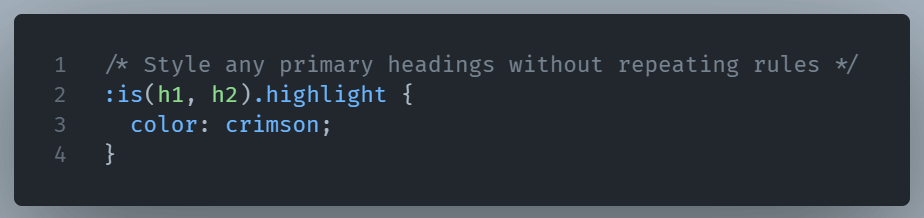
:nth-child(n)— Targets elements based on their index (e.g.,nth-child(2)for the second item,nth-child(odd)for every odd one).:nth-last-child(n)— Same as above, but counting from the end.:nth-of-type(n)— Targets a specific type of element by its order.:not(selector)— Excludes elements that match a certain selector.:is(selector, selector…)— Matches any element that fits one of the given selectors, with cleaner syntax.:where(selector, selector…)— Similar to:is()but with zero specificity weight.:has(selector)— Selects a parent element if it contains something matching the selector inside.
Why Use CSS Functional Pseudo-classes?
Imagine a product list where every 3rd card should be wider. You could manually add classes, but :nth-child(3n) does it automatically, even if new items are added.
Or maybe you want to style every link except those inside your navigation menu. :not(nav a) makes that painless.
And :has() give you a lot of flexibility, letting you style a card differently only if it contains an image.
Some simple examples
1. :has(selector)
2. :where(selector, selector...)

3. :not(selector)
4. :is(selector, selector…)
You can also check an example of the :nth-child(n) functional pseudo-class in a previous post.
A Small Warning
With great targeting comes a little risk. Complex selectors can be harder to read later, especially if you (or someone else) revisit the code months down the line. It’s tempting to go wild with :nth-child() formulas, but sometimes, a well-placed class is still the better choice.