In CSS, pseudo-elements let you style specific parts of an element’s content without needing extra HTML. Think of them as “virtual elements” that live inside your real elements. These element aren’t in your markup, but the browser behaves as if they are.
Creating Content That Isn’t Really There
The most common pseudo-elements are ::before and ::after.
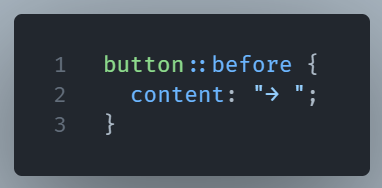
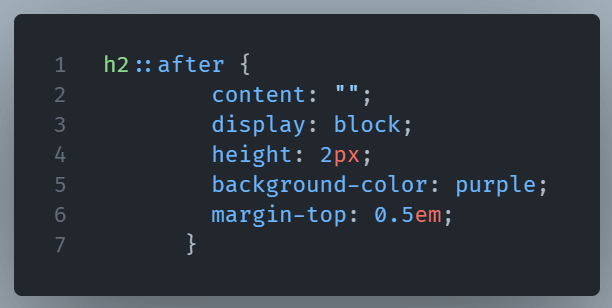
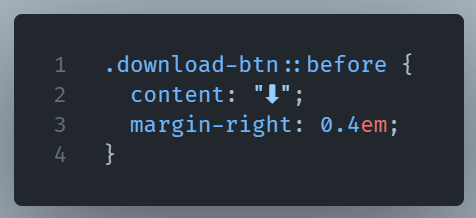
They allow you to insert content before or after the actual content of an element. This content can be text, symbols, or even decorative shapes. They are often used for custom icons, quotation marks, or visual additions without making your HTML messy.
Styling Pieces of Text
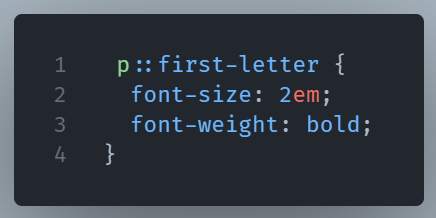
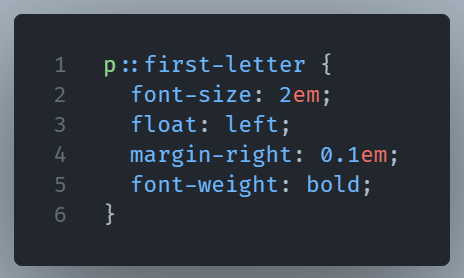
Other pseudo-elements like ::first-line or ::first-letter let you target specific portions of text for styling. This is great for drop caps, highlighted intros, or making the opening line stand out.
What to Consider
Pseudo-elements don’t exist in the DOM the way normal elements do. You can’t directly select them with JavaScript (at least, not without computed styles), and they rely heavily on CSS context.
NOTE: single-colon syntax (:before) is supported for older browsers, but modern CSS standards use double colons (::before) for clarity.
When to Use Them
By mastering pseudo-elements, you gain more control over design without bloating your HTML.
Use pseudo-elements when you want to:
- Add decorative elements without extra markup
Imagine you want every<h2>heading in your site to have a small line underneath it for a clean, minimal design. You could wrap your text in extra<span>tags and style them but that’s messy. Instead you can write:
- Apply styles to part of an element’s content
Suppose you want the first letter of every blog post to look like an old-fashioned drop cap, without manually wrapping it in a span:
- Keep HTML lean but still achieve advanced design effects
Let’s say you want a button to have an icon without placing an<img>or<svg>in your HTML:
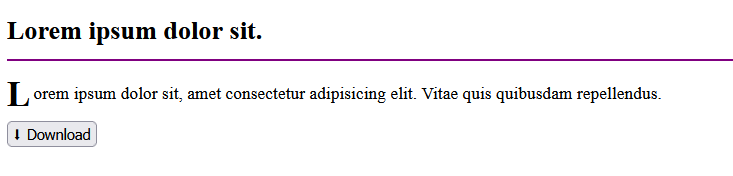
And below are the results of all three: