If you’re building a theme, a custom plugin, or writing any custom code in WordPress, you might need to interact with a third-party plugin. But before you call its functions, you need to make sure that the plugin is actually active.
Calling plugin functions without checking can break your site if the plugin isn’t active. This is especially risky when you’re using hooks or filters that don’t exist unless the plugin is running.
So always check first. It’s a simple safety net that keeps your code stable.
WordPress gives you a clean, built-in way to validate that, eliminating the need for guesswork and manual checks.
Use is_plugin_active()
WordPress provides a handy function for exactly this use case:
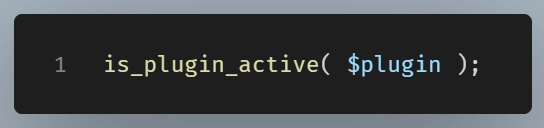
Here’s a real-world example where we check if Yoast SEO is active:
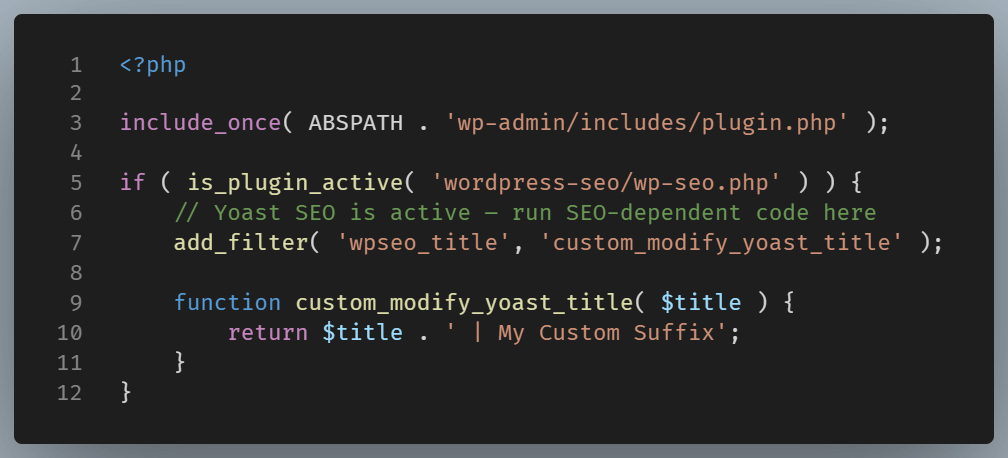
Let’s break down why This Works:
What is include_once( ABSPATH . ‘wp-admin/includes/plugin.php’ );?
This line of PHP code is telling WordPress:
“Include the file
plugin.phpfrom the admin includes folder—but only once—so I can use the plugin-related functions it defines (likeis_plugin_active()).”
Now, let’s go deeper into each part of that line.
What is ABSPATH ?
ABSPATH is a predefined WordPress constant.
It gives you the absolute path to the root of your WordPress installation on the server (i.e. the filesystem path, not a URL).
For example, if your WordPress site lives at:
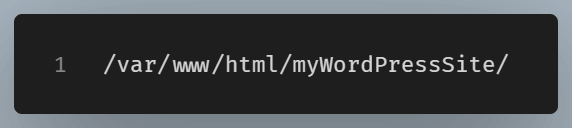
Then ABSPATH will equal:
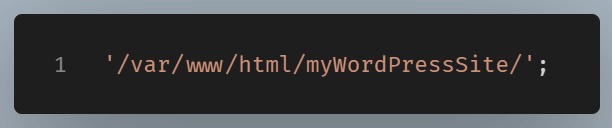
This ensures you don’t need to hard-code directory paths, which can vary between environments (local vs staging vs production).
What Is It Concatenated With?

This is the relative path (from the root of WordPress) to the plugin tools file used internally by WordPress.
So when you combine them, you get something like:

This full path points to a PHP file that defines useful plugin-related functions like:
is_plugin_active()
is_plugin_inactive()
get_plugins()
activate_plugin()
deactivate_plugins()
include_once.Why Use include_once()?
Because you only need that file once, and you don’t want to accidentally load it multiple times (which would cause a PHP error).
Next:
is_plugin_active() checks if Yoast SEO (plugin folder: wordpress-seo, main file: wp-seo.php) is currently active. If it is, you can safely hook into Yoast-specific filters or functions without risking errors if the plugin is inactive.
Final Thought
Knowing whether a plugin is active is essential if you’re writing clean, defensive WordPress code. The is_plugin_active() function is your preferred tool for this.
It takes just one line to protect your site from the white screen of death. Always check first. Then, build with confidence.