It’s Christmas Eve already and no mood to code here! Let’s instead build a Christmas tree with code.
Given that I’ve built some momentum with Python tips recently, I’m going to continue with more Python content.
Creating a Christmas tree using Python is a fun coding challenge that helps you practice and showcase fundamental programming skills such as loops and pattern creation.
It serves as a fun and joyous way to build problem-solving skills, and celebrate the holiday season.
What is the code for a Christmas tree in Python?
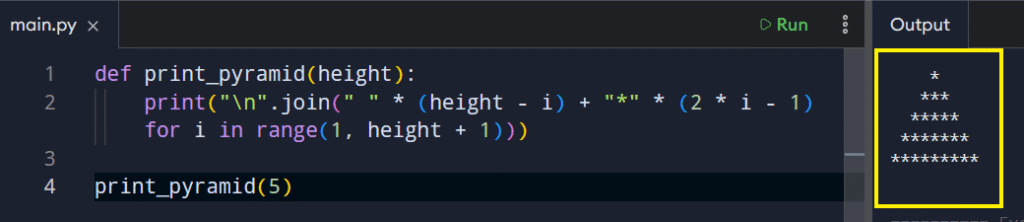
Let’s break this code down step by step so you can understand how it functions.
1. The Function Wrapper
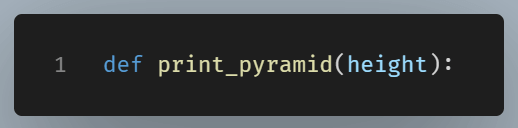
This simply defines the function and takes in height, which controls how tall the tree will be. Everything inside depends on this value.
2. The Generator Expression

This part serves as a replacement for a conventional for loop. It accomplishes the same task but in a more concise manner.
Here’s what it means in plain terms:
range(1, height + 1)loops through each row number" " * (height - i)creates left padding"*" * (2 * i - 1)creates the stars- The
+combines them into one centered row
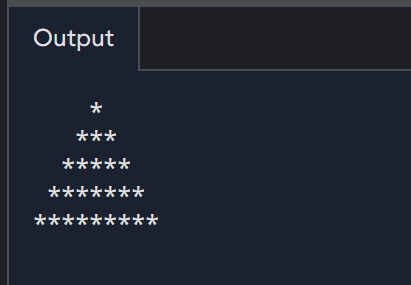
So this single expression is generating each row of the pyramid one by one, without storing them all in memory at once.
It’s functionally equivalent to:
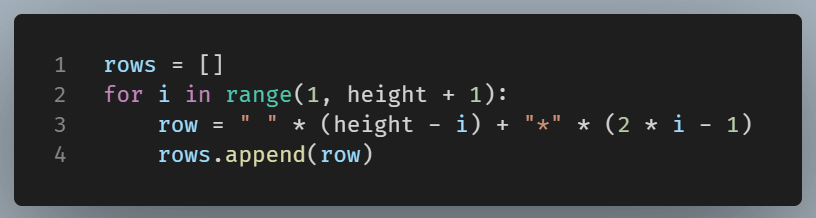
But written in a tighter form.
3. The join() Method
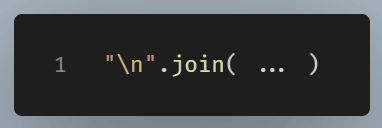
This line using the join() method:
- Takes each generated row
- Joins them together into one single string
- Inserts a newline (
\n) between each row
So instead of printing line by line, Python builds the entire tree as one big formatted string.
4. The print()
Once the full pyramid string is built by join(), print() outputs it to the screen in one shot.
So instead of printing 5 separate times, it prints one fully assembled tree.
Why This Version Is Considered “Clean & Acceptable”
This one-liner is considered good Python because it keeps all logic in one readable flow.
As a result, the code is less cluttered. Consider it like an assembly line where the generator expression creates each row, the join() method concatenates all rows together, and finally print() displays the result.
Every tool is designed to perform a specific task, which helps maintain a clear separation of responsibilities.