When we move a page or change a URL on a website, we face the question of what happens with the old link. That’s what a 301 redirect deals with.
What Is a 301 Redirect?
In simple terms, a 301 redirect is a signal that tells browsers and search engines that a page has moved permanently to a new address. When someone clicks the old link, they’re automatically sent to the new one—without hitting an error page.
Technically, the “301” refers to an HTTP status code. It’s web language for “This resource has been permanently moved.”
So instead of losing visitors (or confusing Google), you’re smoothly guiding them to the right place.
Redirects are critical for maintaining SEO health
Here’s why:
- They preserve link equity — the authority and ranking your original page built up transfer to the new URL.
- They prevent broken links — visitors never hit a 404 error.
- They keep analytics clean — ensuring traffic continues flowing to the right pages.
Without redirects, search engines see your new URL as a different page, meaning you risk losing rankings, backlinks, and visibility.
When to Use a 301 Redirect
You’ll need one whenever:
- You change a page’s permalink or slug.
- You migrate from HTTP to HTTPS.
- You merge or delete old pages.
- You move your entire domain (like from
myoldsite.comtomynewsite.com).
In each case, the redirect acts as a bridge, preserving continuity while updating your structure.
How to Set One Up
In WordPress, you don’t have to edit server files or write code. Plugins like Redirection, Yoast SEO Premium, or Rank Math make it simple. Just enter the old URL and the new destination, save, and you’re done.
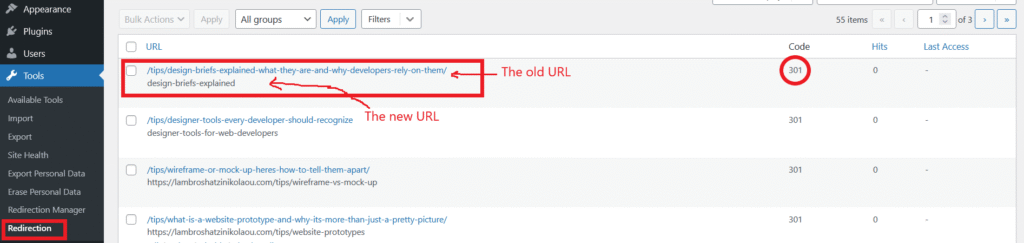
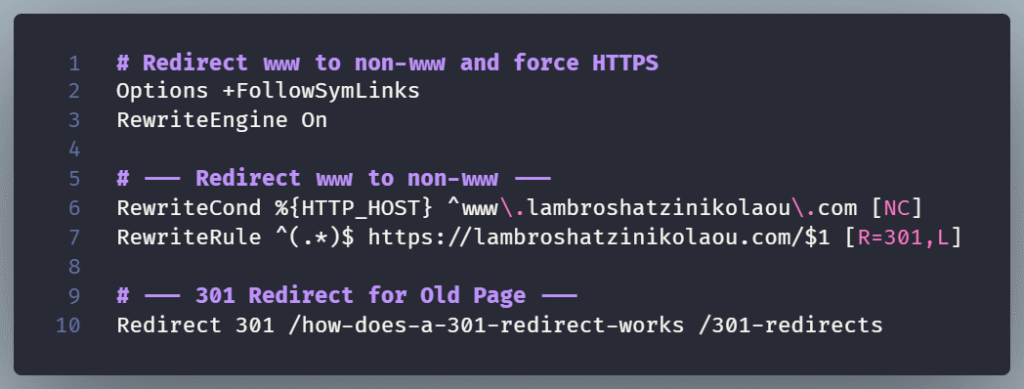
For developers working outside WordPress, 301 redirects can be added directly to an .htaccess file or through a server configuration—still straightforward, just more technical.
The Takeaway
A 301 redirect is one of those tools that keeps your site healthy. It protects your SEO, improves user experience, and ensures your visitors always land where they’re meant to.