A WordPress plugin adds new features to a website without changing the theme or WordPress core files.
Plugins can be as simple as a few lines of code or as complex as an entire application.
Αll plugins start with a similar basic structure. Understanding this structure is the first step in creating your own plugins.
The Plugin Folder
Every plugin lives inside the wp-content/plugins directory. Each plugin has its own folder, which keeps its files organized.
For example:
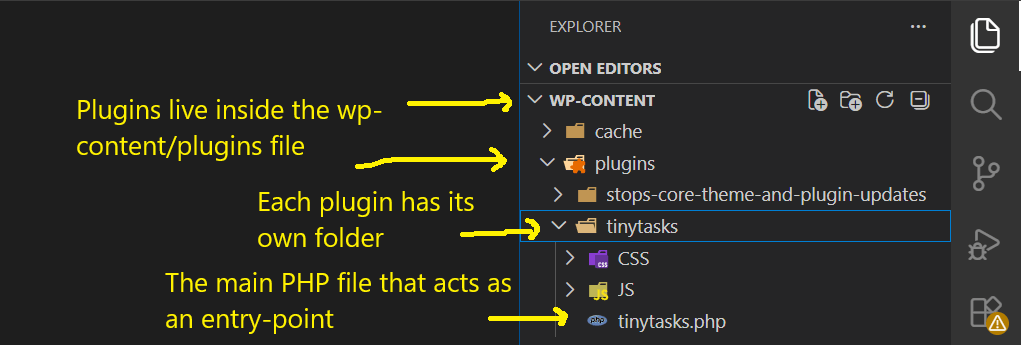
The main PHP file , tinytasks.php in the example, acts as the plugin’s entry point. WordPress reads this file whenever the plugin is activated.
The Plugin Header
Every plugin begins with a special comment block called the plugin header.
A simple example looks like this:

When WordPress loads a plugin (or when you activate it), this is the first file that WordPress executes.
It reads the plugin header to display information on the Plugins page of the WordPress dashboard.
Without this header, WordPress will not recognize the file as a plugin.
Adding Functionality
After the header, you can begin adding your own code.
Most plugins use hooks to connect their functionality to WordPress.
For example:
When WordPress reaches the admin-menu hook, it executes every callbak registered on that hook in order to build the Dashboard menu.
One of those callbacks is register_menu(). This function creates a new top-level menu in the WordPress Dashboard.
Without it, your plugin would have no page in the admin area.
This methodology is a common pattern in object-oriented WordPress plugins:
- The constructor registers hooks.
- The hooks connect WordPress events to class methods.
- Those methods perform the actual work, such as creating menus, enqueueing scripts, or rendering admin pages.
This way you separate initialization from functionality. The class remains organized and easier to extend as the plugin grows.
Growing Beyond One File
As a plugin grows, placing everything in a single PHP file is no longer practical. Developers often split the code into separate folders.
A common structure looks like this:
Each folder has a specific purpose. CSS and JavaScript files go into assets, helper functions into includes, translation files into languages, and cleanup code into uninstall.php.
Final Thoughts
Even though professional plugins may contain dozens of files, they all build upon the same simple foundation. Once you understand that foundation, creating your own plugins becomes much easier.
A basic WordPress plugin consists of a folder, a main PHP file, and a plugin header. From there, you can add functions, register hooks, and organize additional files as your plugin grows.