When you submit a form or click an action link — a hyperlink that triggers a specific operation (delete, edit, etc) instead of just opening a regular page– you want to be sure you haven’t triggered a malicious script. That’s the job of a nonce, short for “number used once (pronounced “nons”).
In WordPress, a nonce is a short, time-limited token that proves a request is legitimate.
What does wp_create_nonce() do?
The function wp_create_nonce($action) creates a unique token associated with the user. The $action string specifies the purpose of the request, such as deleting a post or saving settings.
WordPress links this token to the logged-in user and a timestamp, which limits the token’s validity to typically 24 hours. After that period, the token expires. If someone tries to reuse or initiate the request after it has expired, it will fail (403 Forbidden status code), thus reducing the risk of replay attacks long after the original action.
You can use a nonce to secure custom forms, URLs, AJAX requests, etc.
Why is it important?
Nonces help block CSRF (Cross-Site Request Forgery) attacks.
A CSRF attack tricks a logged-in user’s browser into performing an action on a website without the user’s intent. The attacker doesn’t break into your account directly; instead, they take advantage of your existing session (your cookies) to make your browser send a legitimate-looking request.
Using wp_create_nonce(), paired with validation functions, stops that from happening.
Note: The standard lifespan of a nonce is 24 hours. You can adjust the nonce lifetime in seconds using the nonce_life filter.$nonce_life = apply_filters( 'nonce_life', DAY_IN_SECONDS );
A minimal example
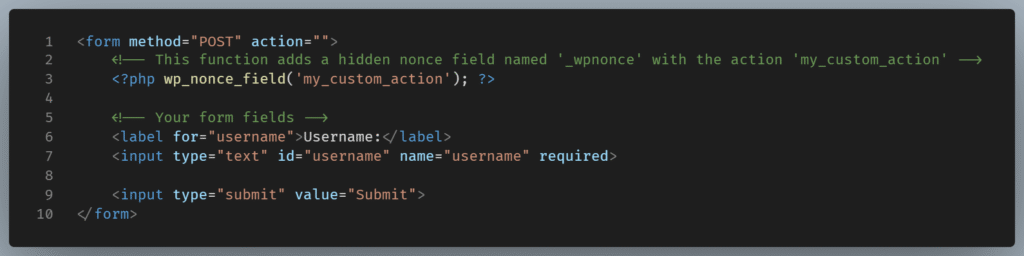
Here’s an example of how to include a nonce in a custom WordPress form using the wp_nonce_field() function, which internally uses wp_create_nonce() to generate a secure, unique token. This token helps protect your form from unauthorized submissions:
When processing the form submission, you verify the nonce to ensure the request is valid and came from your form:
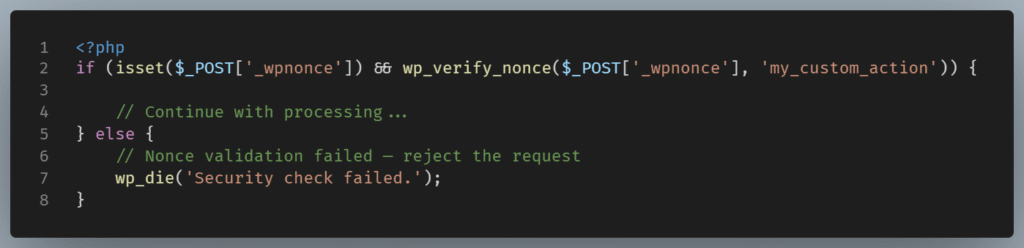
Let’s summarize what is happening in the code:
- The first condition ensures the nonce field exists in the form submission.
- The
wp_verify_nonce()compares the nonce value to the specified action (the same action used when the nonce was created). - If the nonce is valid and within its lifespan (typically 12-24 hours), the function returns a positive value, allowing your code to continue processing safely.
- If the nonce is missing or invalid, you should reject the request, preventing unauthorized or forged submissions.
This pattern is essential for any custom form in WordPress, especially when handling sensitive or state-changing data.
Conclusion
To recap, wp_create_nonce():
- Generates a unique security token
- Protects WordPress actions from unauthorized requests
- Works with associated functions to verify the token
- Has a limited lifespan, enhancing protection without frustration
By understanding wp_create_nonce(), you can create more secure WordPress sites. It’s a simple step that has a significant impact. It ensures that your site only responds to legitimate interactions and keeps potential threats out.