In a previous tip we talked about Python’s @property decorator .
Thanks to properties you can use public attributes by defalult and always have the option to add getters/setters later on without breaking exitsting code. This enables you to introduce getters and settes only when it serves a purpose.
Common reasons to add getters and setters
Validating input before setting a value
If a value must follow rules, a setter is the right place to enforce them.

Computing a value on-the-fly
Some values are derived.
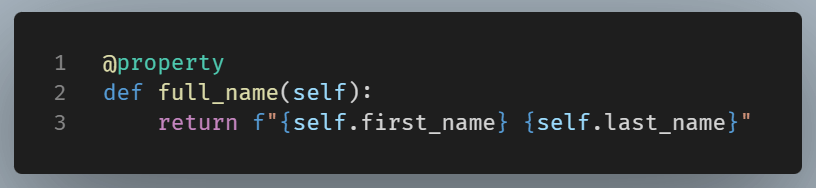
Here, full_name looks like a stored attribute but is calculated each time.
Maintaining backward compatibility when refactoring
Backward compatibility means that existing code keeps working even after internal changes are made to a class. Users of the class do not need to update how they access it. In Python, this is where properties are particularly useful.
The key idea is that you can change how an attribute is implemented without changing how it is accessed.
For example, early on, a class may expose a simple public attribute.
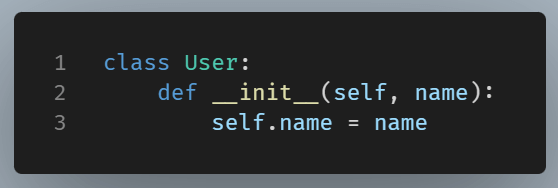
Here the sequence is this:
A class initially exposes a public attribute
self.name = name
External code starts using the attribute everywhere
user.name = “Jordan”
Later, a new requirement appears. You realize that names must follow rules. Maybe empty names are no longer allowed. If you change all usage to set_name(), you break existing code.
What happens if you switch to set_name()?
If you later change the class to this:
There are two distinct failure modes:
Case 1: Silent logic break
If you allow arbitrary attribute assignment, then this line silently breaks logic:
user.name = "Jordan"
Now name exists on the object, but your class logic uses _name.
Python creates a new attribute named name on the object.
Now the object has:
user.namecreated dynamicallyuser._nameused internally by the class
These attributes are disconnected. This violates our programming logic. Your class state becomes inconsistent so bugs appear silently.
Case 2: Attribute assignment fails
Alternatively, if yourestrict attribute creation with a double underscore (self.__name = value), the assignment outright fails.
This is safer, but the change still breaks the code.
Either way, old code no longer works as intended. The break does not happen in one place. It happens everywhere the class is used.
So, you are forced to hunt down every usage and rewrite it:
user.set_name("Jordan")
This is where backward compatibility matters.
With a property, you keep the same access pattern, but you change what happens internally.
Properties allow you to:
- Keep
user.nameworking - Add validation later
- Avoid breaking changes
- Preserve the public contract
Aaccess remains the same:
user.name("Jordan")
But internally. the structure is different:
This is an example of backward compatibility in practice.
Triggering side effects
A side effect is any action that happens in addition to updating a value.
Common side effects include triggering an audit, upadating another related value, writing a log .etc.
Note: In object oriented design, side effects should be controlled by the class, not by outside code.
Here, we have created a setter for the email property.
Let’s say we change the email from old@example.com to new@example.com and we want to print this change. The print happens in addition to altering the email address. So the setter updates the internal state and then print the change.
That second action (printing) is the side effect. Code prints automatically on every change. Printing always happens when email address changes.
Had we implemented a different design without a setter, every caller would need to remember to print changes.
This spreads responsibility across the codebase.
Summary
Properties offer you the freedom to operate with simplicity. Start with simple public attributes, and add properties later when you need:
- Input validation
- Computed values
- Backward compatibility
- Controlled side effects
This follows the Pythonic principle, which can be summed up as: “Keep it simple unless there’s a good reason to complicate things“. Properties ensure that when you do need more control, you can add it without breaking existing code.