In CSS, overflow controls what happens when content doesn’t fit inside its parent box. Sounds simple, but it has a really big impact on layout, readability, and user experience.
When Content Doesn’t Fit
Imagine you’ve got a fixed-width card with a long block of text. If the text is too long, the browser has to decide: should it clip the content, add scrollbars, or let it break out of the box? That decision is exactly what the overflow property makes.
The most common values are:
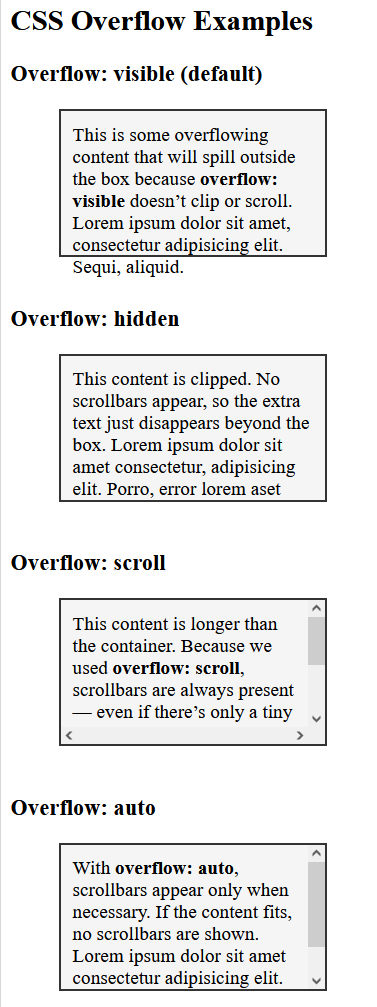
visible– This is the default. Extra content spills outside the container, which can break layouts if not handled carefully.hidden– Anything that doesn’t fit is cut off, invisible to the user. It is clean, but potentially confusing if important info is lost.scroll– Always shows scrollbars, even if content fits. It is useful in controlled layouts, but can look cumbersome.auto– Scrollbars appear only when needed, striking a balance between function and aesthetics.
These are not the only values overflow can have.
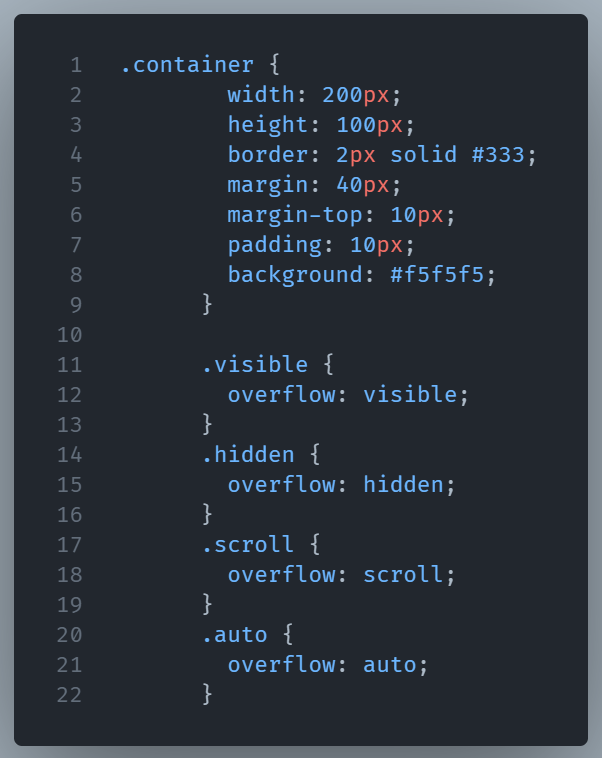
Here’s a simple HTML + CSS snippet that demonstrates these four main overflow values.
Bellow is a visual breakdown of how CSS overflow works:
Conclusion
It’s tempting to always hide overflow to keep designs tidy, but that can backfire. For instance, clipping a product description may frustrate users who expect to read more. On the other hand, visible overflow can impair the visual flow of a page. Striking the right balance means thinking not just about design, but also usability.