A core concept in programming involves character-to-number mappings.
When working with text in JavaScript, sometimes you’ll need to deal with the character codes behind the letters. That’s where ASCII comes in and where methods like charCodeAt() and fromCharCode() become are needed.
Let’s walk through what ASCII is, how it works, and how you can use it in your code.
What Is ASCII?
ASCII stands for American Standard Code for Information Interchange.
It’s a character encoding system that assigns a number to every character—letters, digits, symbols, and control characters.
For example:
“A”is 65“a”is 97“0”is 48- A space
“ “is 32
These numbers are universal, which is why they’re so widely used in programming.
Using charCodeAt(): From Character to Code
JavaScript lets you get the ASCII code of a character in a string using the .charCodeAt() method.
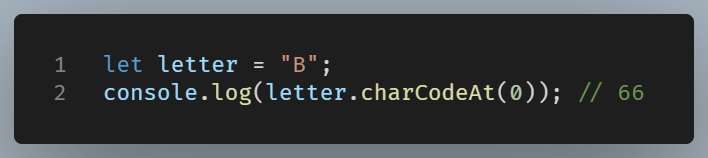
You can use it to compare characters by their code values, sort strings alphabetically, or do simple encryption tricks (like Caesar ciphers).
Using fromCharCode(): From Code Back to Character
You can convert a number into a character using String.fromCharCode():
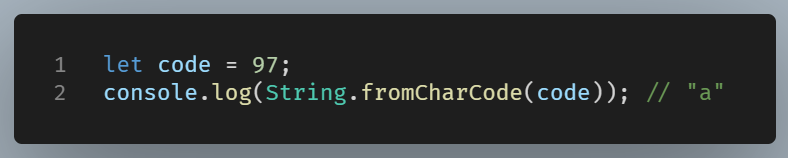
So if you store or process numbers, this method lets you turn them back into readable characters.
Real Use Case
Let’s say you want to shift every letter in a string by 1 position:
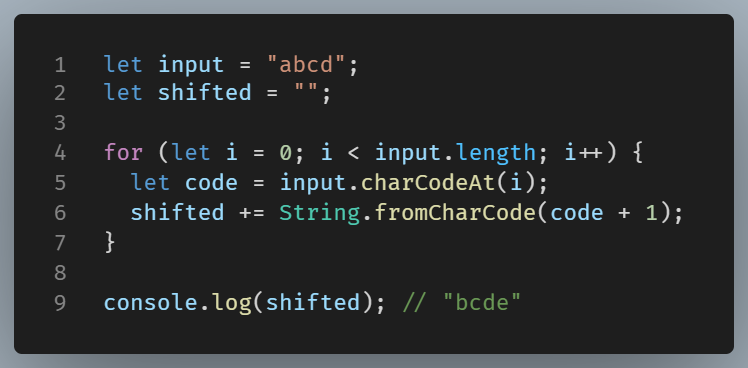
This is a simplified example, but it shows how ASCII codes can power string manipulation.
In Summary
ASCII is a foundational concept for handling text in code. With charCodeAt() and fromCharCode(), JavaScript gives you the tools to inspect and transform strings (29/9 tip) at the character-code level.