There are many practical reasons for wanting to remove a page from Google Search Results. Some pages may become outdated, or certain personal information, like addresses and CVs, might not need to be public anymore.
The key idea is simple. You either tell Google not to index the page, or you remove access to it entirely.
Use the Noindex Tag
One of the most reliable methods is adding a noindex tag to the page.
noindex, unlike robots.txt, lets Google crawl the page but then excludes it from search results. This is the safest way to quietly remove something from the results without deleting it.

When Google crawls the page and sees this tag, it will remove the page from its index over time.
This method works well when the page should still exist for users, but you just do not want it in search results
If you have a WordPress site, you might want to consider using a plugin for this task. Just be cautious to apply it only to the specific pages you wish to exclude from Google.
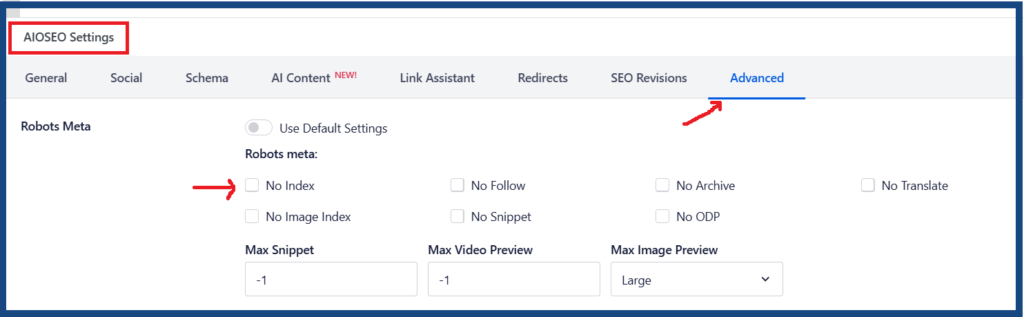
Delete the Page from Your Website
If the page is no longer needed, you can remove it completely. This is the most obvious method. If you delete the page, Google will eventually notice it’s gone and drop it from results.
Options include:
- just deleting the page
- returning 410 status code
A 410 Gone response tells search engines and browsers that a page has been permanently removed. Here’s how to implement it depending on your setup:
Apache (.htaccess)
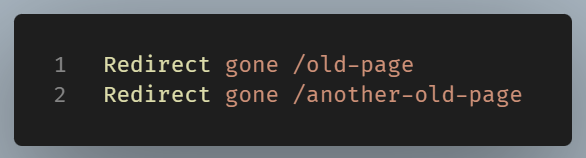
If using WordPress you can easily achieve this with a plugin.
With the Redirection plugin:
The free Redirection plugin supports 410 responses directly:
- Install & activate Redirection (by John Godley) from the WordPress plugin directory
- Go to Tools → Redirection
- Click Add New
- Enter the source URL in the URL field
- Change the Action dropdown from “Redirect to URL” to “Error (410 Gone)”
- Save
Easy done with no code needed.
Without a Plugin:
Add this to your theme’s functions.php or an MU plugin:
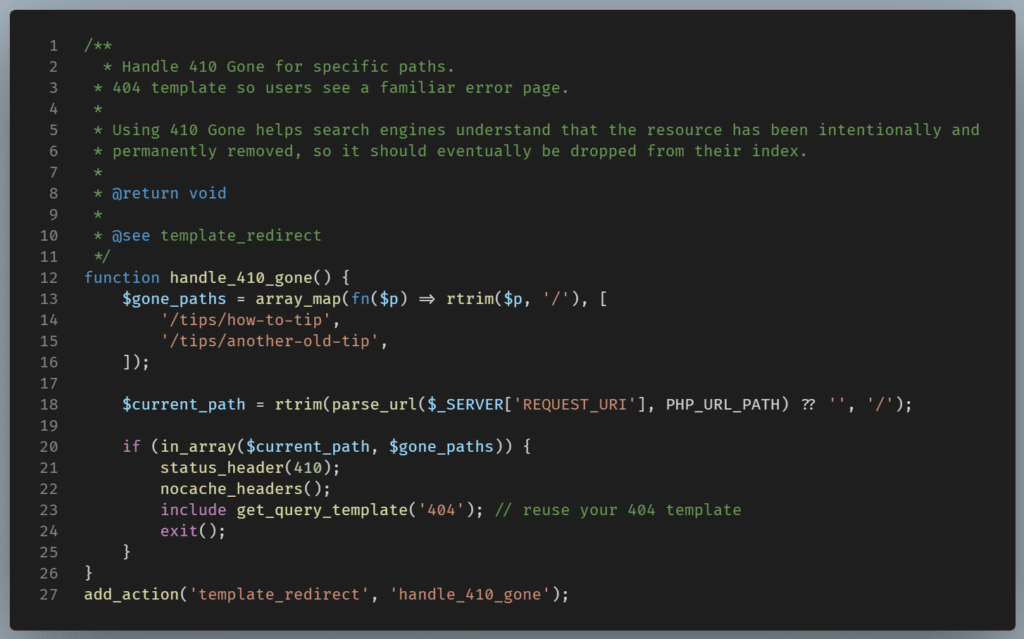
Unlike a 301 redirect, a 410 has no destination — you’re telling browsers the resource is gone for good.
Google will eventually drop the page from its index after detecting these responses. It typically de-indexes 410 pages faster than 404s.
Use Google Search Console Removal Tool
You may find this tool useful if you have a URL associated with a Search Console property that you own and need to quickly remove it from Google Search. This could be necessary, for instance, if you’ve updated a page to eliminate sensitive information.
Steps to follow:
- Go to the Removals section
- Enter the page URL
- Submit a removal request
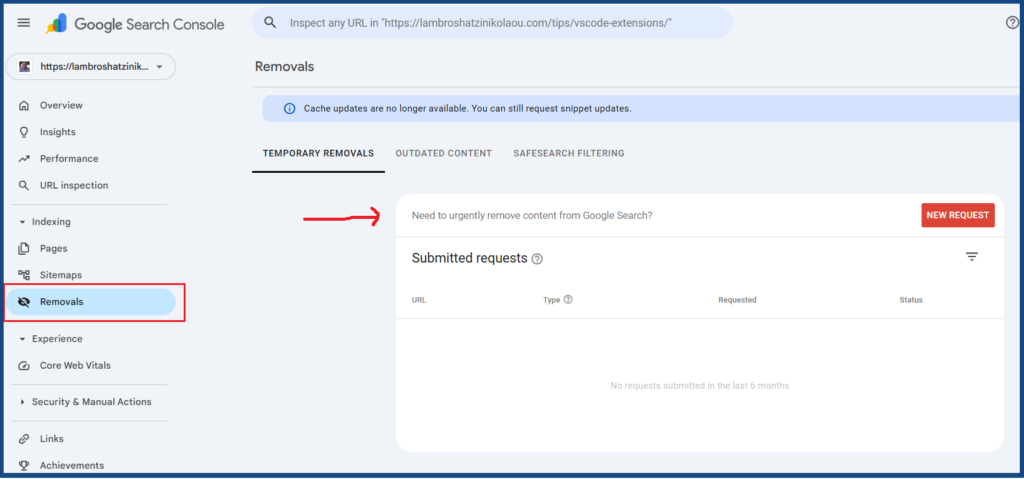
This hides the page quickly, but it is temporary. You still need a long term solution like noindex or deletion.
Wrapping Up
The process of removing a page involves more than just a single action; it requires a combination of signals. You need to determine if the page will stay active, be hidden, or be entirely deleted.
In practice, a good approach is:
- use
noindexfor pages you keep - return
410for pages you remove - use Search Console for quick action
You decide what belongs in search results and what does not. With the right method, you keep your site focused and your content aligned with your goals.