The Python Standard Library offers a wide range of modules that are available with Python.
A module is essentially a file that contains pre-written and reusable Python code, including functions, classes, and data structures that you can incorporate into your projects.
Once Python is set up, these modules are already there for you to use. There’s no need for any additional downloads.
Understanding the Python Standard Library
The Python Standard Library contains modules that solve common problems. These problems range from working with dates and time to handling files, math, random numbers, using regular expressions and even basic networking.
Instead of writing everything from scratch, you import what you need and focus on your program’s logic.
This library encourages reuse. Many everyday tasks have already been solved in a clear and reliable way.
Some common examples include:
mathfor mathematical operationsrandomfor generating random valuesdatetimefor working with dates and timesosfor interacting with the operating system
Importing a Module the Simple Way
To use a module, you must import it. For this you use the import keyword. Import statements are typically placed at the beginning of the file.
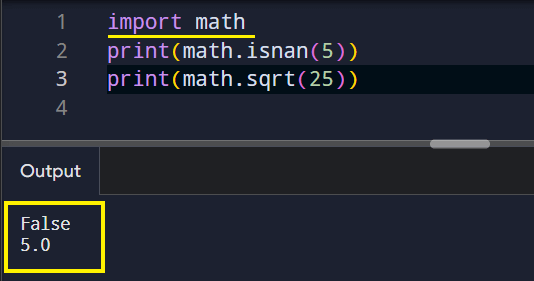
Here, the module name acts like a namespace. You access its functions using dot notation.
Importing Only What You Need
Sometimes you want just one function instead of the entire module. Python allows that.
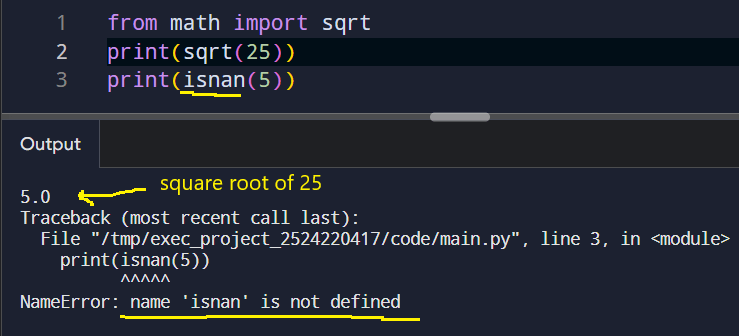
This style keeps code shorter, but it also means you must avoid name conflicts.
NOTE: Name conflicts in Python occur when two or more identifiers (like variables, functions, or modules) share the same name within a given scope, leading to uncertainty about which identifier is being referenced.
Using an Alias
Modules can also be imported with a shorter name. This is common in practice.
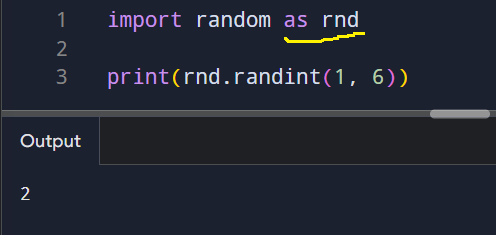
Aliases improve readability when module names are long or frequently used.
Wrapping Up
Python comes bundled with a comprehensive set of pre-built modules and tools ready for immediate use upon installation.
Imports help keep code organized and focused. Instead of long files filled with helper logic, you rely on tested modules. This makes programs easier to read and maintain.