Progressive enhancement is a web design philosophy that puts the user first, regardless of their device,browser, or connection speed. At its core, it’s about starting with a solid foundation and then adding layers of functionality for users who can support them.
Let’s break that down.
Start with the Basics—Then Enhance
Imagine you’re building a website for a local store. With progressive enhancement, you begin by making sure the core content, like the menu, address, and contact form, is accessible using plain HTML. This guarantees that everyone can get the essentials, even if they’re using an old browser, a slow connection, or assistive technology.
From there, you enhance the experience. You add CSS for layout and design. Then, apply JavaScript for animations, form validation, or interactive menus. If something fails (say, a script doesn’t load), the basic experience still works.
That’s the key difference: the site doesn’t break, but instead it continues to function, even with reduced functionality.
Why Progressive Enhancement Matters?
Every user browse the web differently. Some disable JavaScript. Others rely on screen readers. Some users operate their mobile phones on inconsistent networks.
So, recapping, progressive enhancement:
- Makes sites more accessible
- Improves performance on slower devices
- Reduces critical failures
- Keeps you aligned with best practices
Sites built this way are more resilient, more flexible, and easier to maintain over time.
Real-world example that shows how progressive enhancement works
Here’s a simple, real-world example that shows how progressive enhancement works in code. We’ll build a basic contact form, starting with plain HTML, then layering on CSS and JavaScript to enhance the user experience.
Step 1: Start with Functional HTML
This is the base layer—accessible and usable even if styles or scripts don’t load.
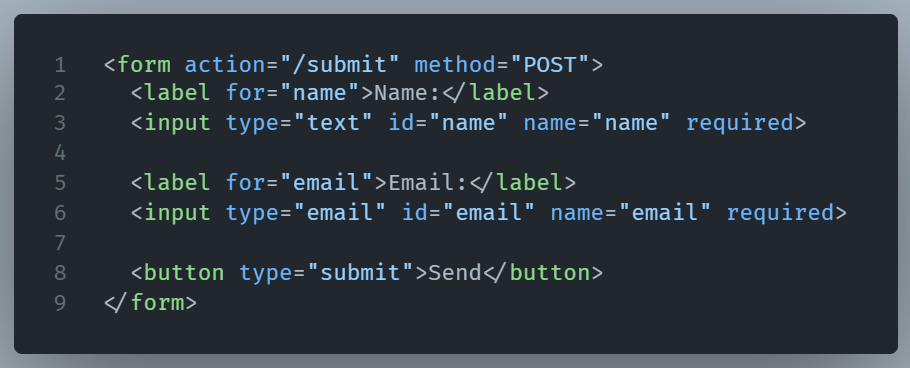
What works:
- The form is submitted via HTTP.
- Users can fill it out with or without JavaScript.
- Screen readers and assistive tech can read it clearly.
Step 2: Enhance with CSS
Now, add visual style to improve layout and usability.
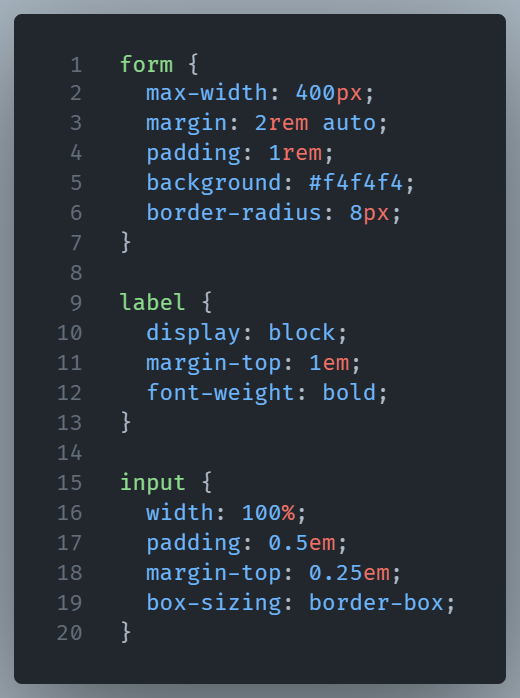
What’s enhanced:
- The form looks polished and easier to navigate.
- But if CSS fails to load, the HTML form still works just fine.
Step 3: Enhance with JavaScript
Now, add a little interactivity, like client-side validation and confirmation.
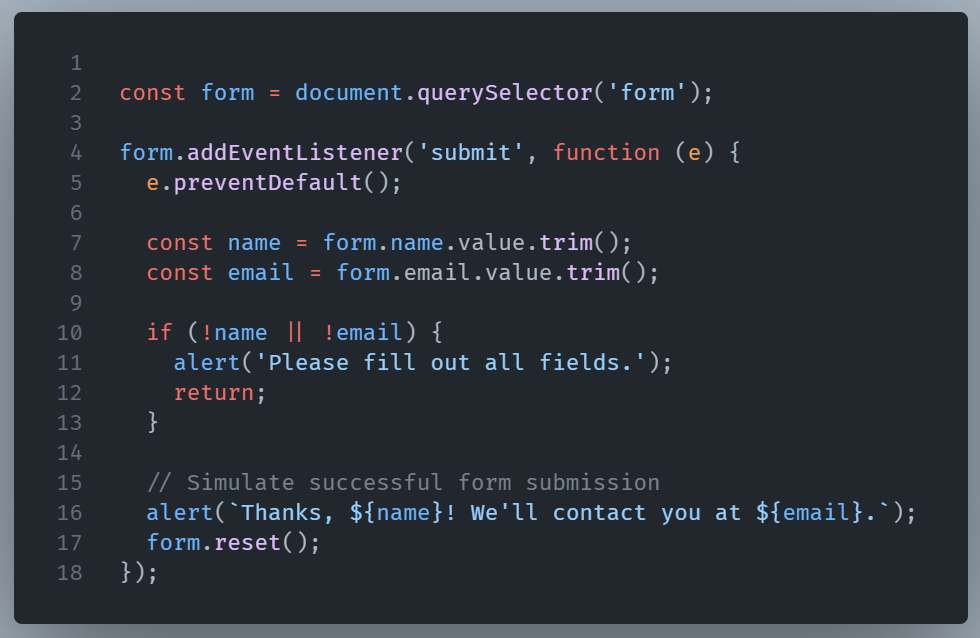
What’s enhanced:
- Instant feedback without reloading the page.
- Smoother experience for modern browsers.
- If JavaScript is disabled, the form still submits normally via the action URL.
Final Thoughts
This layered approach is progressive enhancement in action:
- HTML gives you a reliable foundation.
- CSS adds beauty and usability.
- JavaScript adds interactivity and polish.
Even if one layer fails, the others still hold up. That’s the whole point: build for everyone, then enhance when possible.