Now let’s move from theory to practice.
JavaScript offers a few ways to make requests.
We are going to use the most modern and beginner-friendly one wich is fetch.
Imagine you’re building a sign-up form, and when the user submits it, you want to send their information to a server.
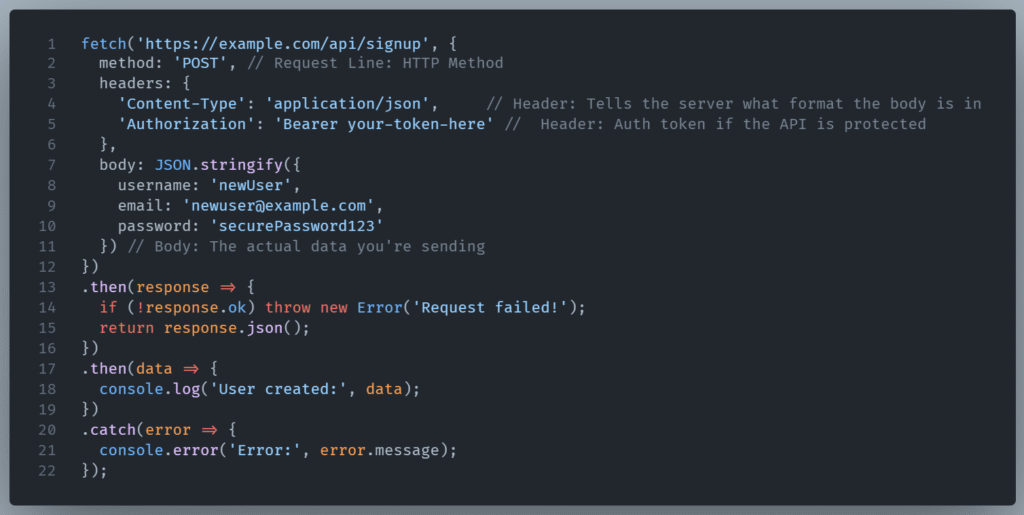
Let’s disect this JavaScript Post request using the fetch API.
What resource to fetch
The purpose of this piece of code is to send an HTTP POST request to the URL https://example.com/api/signup
The URL is defined as a string in the first parameter.
Configuring the request
The second parameter is an object that allows us to configure the request.
The Method
Here we use Post since this is the recommended method for creating a user account.
The Headers
Then the headers are defined.
The first header here is the Content-Type
An HTTP Content-Type header explains how to process the message body’s data.
The original media type of the resource is specified before encoding.
This notifies the server the request body is JSON.
Here 'Content-Type': 'application/json' indicates that the body of the request is JSON-encoded.
The second one is the Authorization header.
Here it defines the authentication scheme as Bearer and passes a Bearer Token.
'Authorization': 'Bearer your-token-here'
HTTP can use bearer authentication, a security scheme employing tokens (often called bearer tokens) to authenticate users or clients.
A Bearer Token, a cryptic string, is generated by the server after a successful authentication. It shows the client is authorized.
The body
The body contains the data to send.
JSON.stringify() converts the JavaScript object into a JSON-formatted string, which is required when sending JSON data.
Here the data includes username, email, and password fields, representing the user signup information.
Handle the response from the server
The first .then block handles the response from the server. It ensures the request was successful and extracts the JSON data from the response.
The response.ok property is a boolean provided by the Fetch API that indicates whether the HTTP response status code is in the range 200-299.
response.ok === true→ status code is 2xx (success).response.ok === false→ status code is 4xx or 5xx (client or server error).
The reason we check if the request is successful is that by default, fetch() does not throw an error for HTTP errors like 400, 404, 500.
So if the server returns a 500, fetch() resolves successfully although response.ok will be false. This could end up at parsing an error response as JSON, which might lead to confusing bugs.
Now if the HTTP status code indicates failure, it will manually throws an error allowing it to be caught in the .catch() block and handled properly.
Extracting the JSON data from the response
The body of the response isn’t automatically usable as a JavaScript object — it’s still a readable stream.
To extract the JSON content from that response, you use the code in line 15.
return response.json();
This does two things:
- Reads the response body
- Parses it as JSON, turning it into a usable JavaScript object.
Since reading and parsing the body is asynchronous, response.json() returns a Promise.
So you need .then() and .catch() to access and handle the parsed data.
Conclusion
JavaScript, using the modern fetch API for HTTP requests is a very common way in web applications for registering a new user via an API.