A web browser is a software application that lets us access and use websites on the internet.
It does so by gathering web data and displaying them on our computer.
The word browser was originally used to describe programs that let users navigate text files online, in the before world wide web era.
Web browsers are important to most people since nowadays accessing web applications is an integral part of daily life.
How does a browser work?
A web browser follows these steps to load and display a webpage:
User Request
The user enters a website URL (e.g., www.example.com) into the browser’s address bar or clicks on a hyperlink.
DNS Lookup
The browser uses a DNS server to transform the human readable URL the user has typed into a numerical IP address (such as 192.168.1.1) that locates the website’s server.
Establishing a Connection
The browser sends a request to the web server using the Hypertext Transfer Protocol (HTTP).
Retrieving Web Page Content
The server processes the request and sends back the requested web page, which includes HTML (structure), CSS (styling), JavaScript (interactivity), images, and other media.
Rendering the Web Page
The browser’s rendering engine processes the received HTML, CSS, and JavaScript files and converts them into a web page displayed on the computer screen.
Interactivity
If JavaScript is used on the page, it can modify content dynamically, respond to user actions, and retrieve additional data without requiring a full reload.
Here is a simple drawing representing this process:

The History of Web Browsers
The way people experience the internet has been drastically better thanks to the dramatic improvements in web browsers.
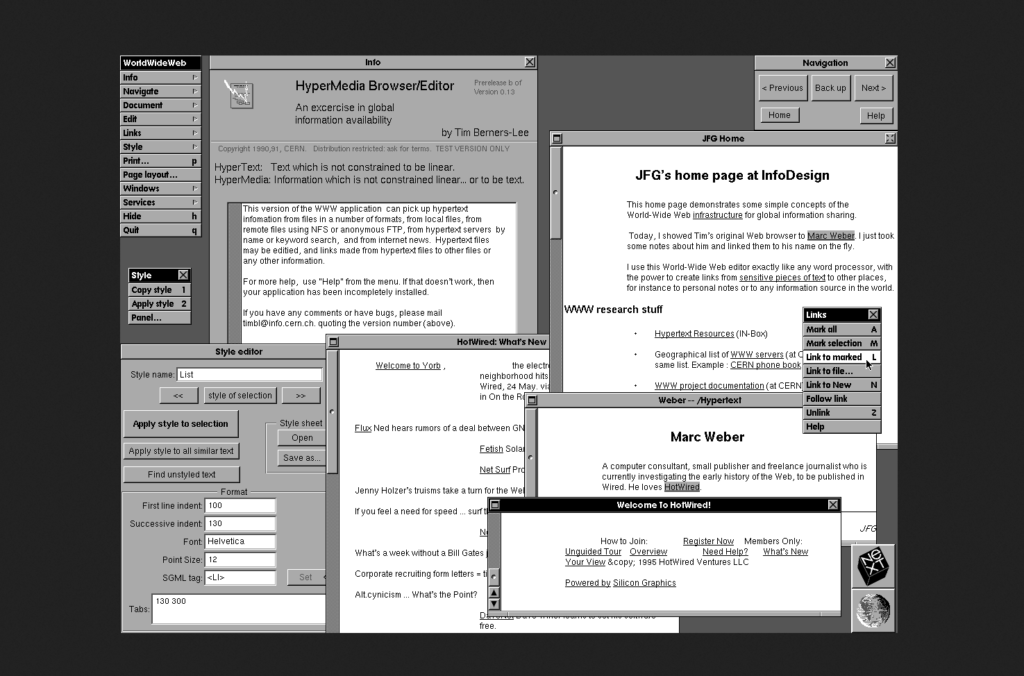
The first Web browser, called WorldWideWeb, was invented in 1990 by Tim Berners-Lee.
To avoid confusion with the World Wide Web, he later renamed the browser Nexus.
This browser had developed a simple text-based interface.
The first Web browser with a graphical user interface was Mosaic, which was created in 1993 by Mark Andreessen’s Netscape.
The popularity of Web exploded thanks to this browser and the Netscape Navigator, an upgrade of this browser was developed by the same company next year.
All modern browsers are descendants of these early browsers.
Key Components of a Web Browser
Web browsers typically include these standard components:
- Address Bar – Allows users to enter URLs or search queries.
- Navigation Buttons – Includes Back, Forward, and Refresh buttons for browsing history.
- Rendering Engine – Renders HTML and CSS to display web pages.
- JavaScript Engine – Executes JavaScript code to add interactivity.
- Network Module – Handles HTTP/HTTPS requests and responses.
- Cache – Stores web page resources for faster loading.
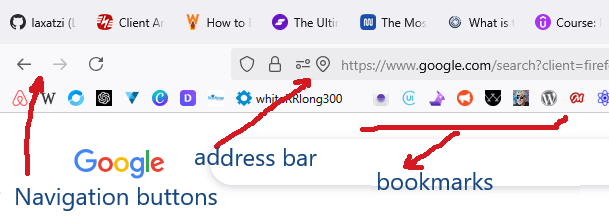
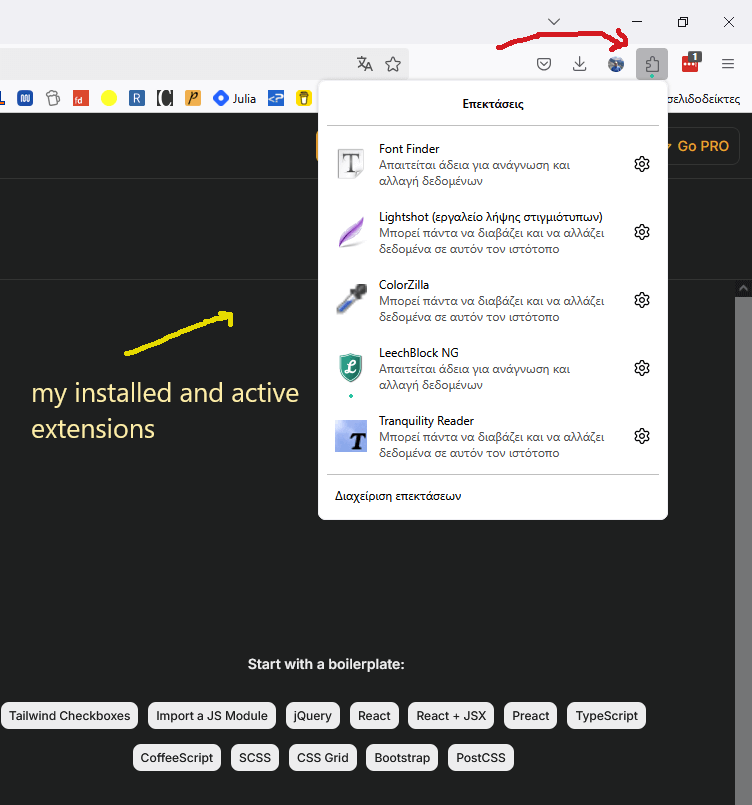
Most browsers can be enhanced with add-ons to increase their capabilities.
Different browsers
There are many browsers out there.
The choice of using one or more depends on personal preference and desires.
Here are some popular browsers catering to diverse needs.
- Chrome – Google’s browser is the most popular one, due to its speed and innovative features. It is easy to use since having a Google account it keeps bookmarks, history, and settings in sync across different devices.
- Firefox – Mozilla’s Firefox strong point is security. Due to ongoing security and privacy upgrades, it stands out as an exceptionally secure browser.
- Brave – Brave’s default setting blocks ads and trackers. Ad blocking is free, no need to pay anything. This is the main advantage of this browser. It is also fast and secure.
- Safari – Safari is the default browser for Mac and iOS devices. It is a fast and secure browser that works well with other Apple products.
- Opera – Operas advantage is safety and privacy. It provides a free, no-signup VPN that hides the IP address of the user.
- Edge – Edge is optimized for memory and CPU usage. This browser is among the fastest and most resource-efficient on the market.
There’s fierce competition in the browser market. And a clear winner.
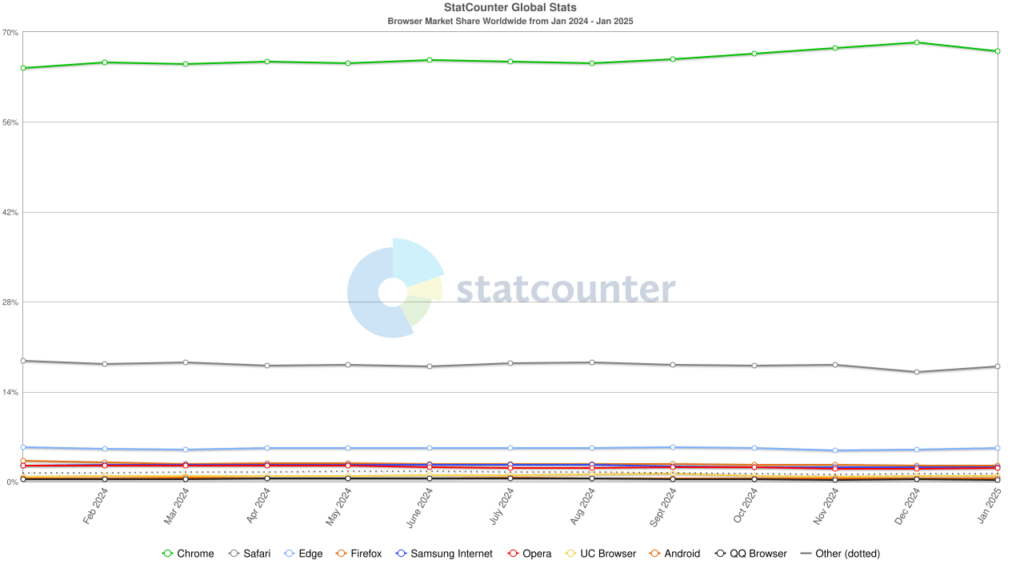
This competition boils down to money.
It is indicating that although Firefox market share is low; it brought in to Mozilla corporation nearly $497 million, with most of these coming from royalties.
Personal preference
There are a lot of great browsers out there. Making a choice is not easy.
I mainly use Firefox with uBlock origin as an ad blocker. It is a decision based on emotion and inertia rather than research. I love it since I’ve been using it for ever.
Recently I discovered Brave and I really like it.
So I switch back and forth between these two browsers. I also use Google as a Web Development tool since DevTools is the best web development browser environment.