String interpolation means placing a variable directly inside a string so PHP can replace it with its value. Interpolation makes output easier to write and easier to read.
Instead of joining pieces of code manually, you let PHP do it for you.
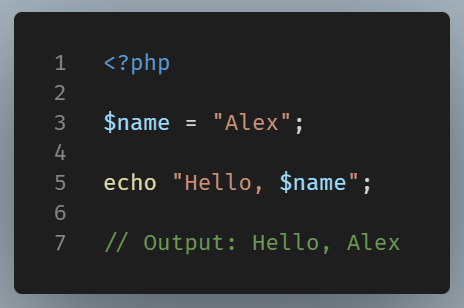
The variable $name appears inside the string, and PHP replaces it with "Alex".
Double Quotes Are Required
In PHP, interpolation works inside double quoted strings. It does not work inside single quoted strings.
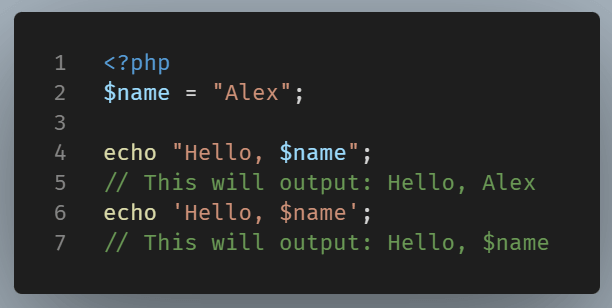
The first string reads the variable. The second prints the text exactly as written.
Using Curly Braces for Clarity
Curly braces makes using variables easy and clear.
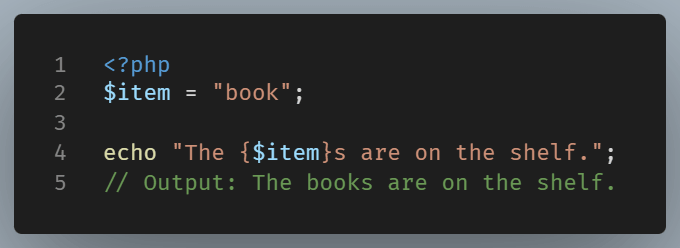
Without braces, PHP might try to read a variable named $items, which is not what you meant.
Interpolating Array Values
You can also insert array values into strings.

This pattern is common when working with user profiles, product data, or content extracted from a database.
Interpolation Versus Concatenation
PHP also allows string concatenation with the dot operator (.).
This works well, but interpolation is often cleaner for simple output.
Conclusion
String interpolation is a feature in PHP that allows for a more natural output. It positions variables alongside the text they relate to, making it easier for coders to read and write their code smoothly. The main rule is simple: use double quotes, and add curly braces when the variable needs clearer boundaries.