language_attributes() is a WordPress-specific function. It is not part of PHP itself.
That means that it works inside a WordPress theme or plugin, but would fail in plain PHP outside WordPress, since standard PHP does not include that function.
The function is provided by the WordPress and is available only when WordPress is loaded.
What the language_attributes() function does
WordPress stores the site language in the admin settings.

The language_attributes() function reads that setting and prints the correct HTML attributes.
Internally, WordPress reads:
- The site language setting
- Text direction (
ltrorrtl)
Then it prints the proper HTML attributes automatically.
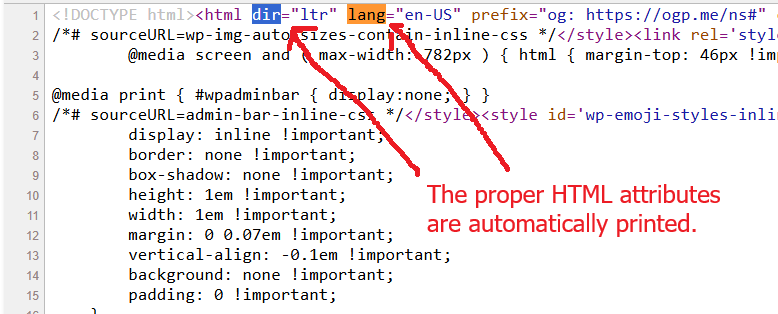
Using it helps with accessibility, SEO, and browser rendering.
Without it, browsers and assistive technologies may interpret the page incorrectly.
How does it help with browser rendering?
The language_attributes() function helps browser rendering because it outputs the correct lang and dir attributes on the <html> element. Browsers use these attributes to decide how text should behave and display.
Text direction and layout
This is the biggest rendering impact.
Languages such as Arabic and Hebrew use a right-to-left text flow. When the browser sees:
It changes how text and layout behave.
That includes:
- Text alignment
- Cursor movement
- Punctuation placement
- Input field behavior
- Table flow
Without the correct direction, the page can feel broken or difficult to read.
Font shaping and glyph rendering
Some languages need special character shaping. Browsers use language metadata to improve typography.
For example fonts may choose different glyph variants based on language
The lang attribute helps browsers apply the correct text rules.
Line breaking and word spacing
Different languages break lines differently.
English uses spaces between words. Japanese does not work the same way. Browsers rely on language information to decide where lines can wrap, and how words are segmented.
Without a proper lang attribute, line breaks may appear awkward.
Speech and accessibility behavior
Screen readers depend heavily on the document language.
If the browser sees lang="fr".
Assistive tools switch pronunciation rules to French.
Without that attribute words may sound incorrect and pronunciation becomes confusing.
While this affects accessibility most directly, browsers themselves also participate in that process.
Browser features and translation tools
Modern browsers also use the language setting for:
- Auto translation prompts
- Spell checking
- Grammar suggestions
- Form autofill behavior
For example, Chrome may offer page translation only after detecting the page language.
A small but important detail
Some beginners hardcode the language manually:
<html lang="en">Hardcoding may work well for a single language setup, but it can become restrictive down the line. If the site’s language changes, the markup will be outdated.
The function language_attributes() ensures everything stays aligned with WordPress settings automatically. This method is safer and cleaner.
When you should use it
Use it in every proper WordPress theme, specifically in header.php.
It belongs inside the <html> tag and should normally appear only once per page.
Example:
When you should not use it
Do not use it:
- Inside normal page content
- Multiple times in the document
- Outside the
<html>element - In standalone PHP scripts unrelated to theme rendering
It is specifically designed for the document root element.
Wrapping Up
The language_attributes() function in WordPress ensures that the language output is automatically aligned with the site settings. If the site language changes later, the HTML updates without manual edits.
That consistency is important because browsers treat the <html lang=""> attribute as the primary language signal for the entire document.