Loops enable your code to execute tasks multiple times without unnecessary repetition of effort. Instead of writing the same line ten times, you write it once and let the loop handle the rest.
The for Loop
Most beginners meet the for loop first. for loops are clean and easy to understand. This simplicity makes them perfect for understanding sequences, whether they are lists, strings, or ranges of numbers.
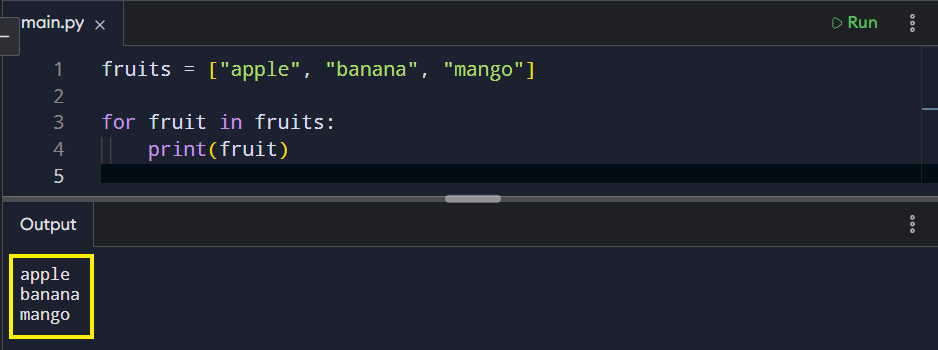
The for loop is used when you want to repeat something a fixed number of times or loop through a collection.
Python takes one item at a time from the list, and the loop runs once per item. In a for loop, you never manage indexes manually since Python does that for you.
Use of the range() method
With range(), you control the count. When you want to run a loop five times, you can just do that in one tidy line.
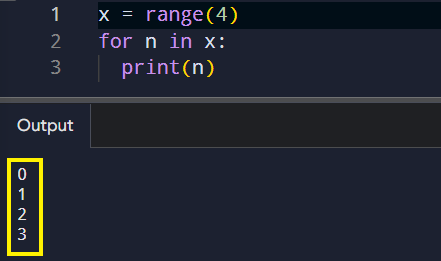
It is short, readable, and effective.
The while Loop
When it comes to loops, the for loop is designed for counting, whereas the while loop is centered around conditions. A while loop keeps running as long as something remains true. This makes it ideal for input validation and long-running processes.
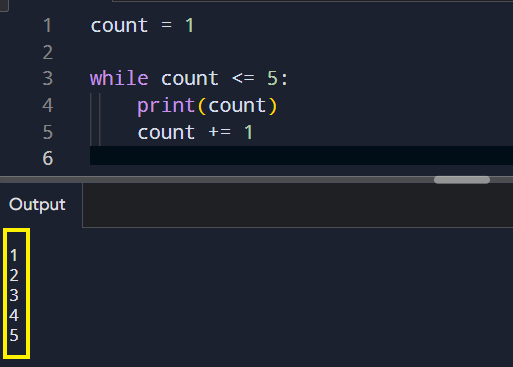
What’s important here:
- The loop depends on a condition.
count += 1is critical—without it, the loop would run forever (infinite loop).- This pattern is very common in input validation and game logic.
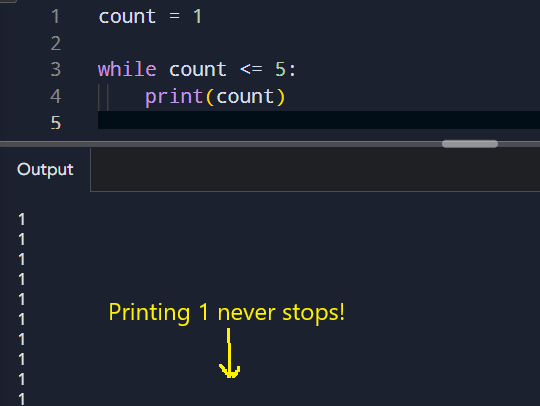
Note: A while loop requires you to be alert, since if the condition never becomes false, the loop never ends. That’s called an infinite loop, and every developer meets one sooner or later.Example of an infinite loop:
Steering the Flow Without Stopping the Machine
Sometimes, you don’t want to run every step. That’s where control keywords come in.
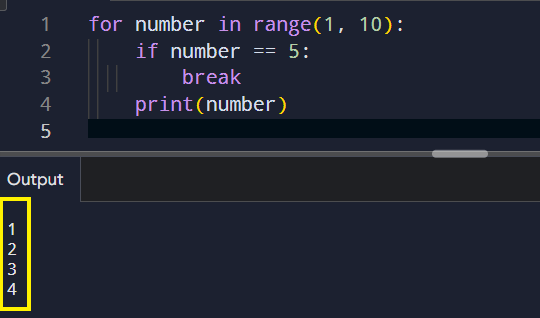
- break exits the loop immediately.
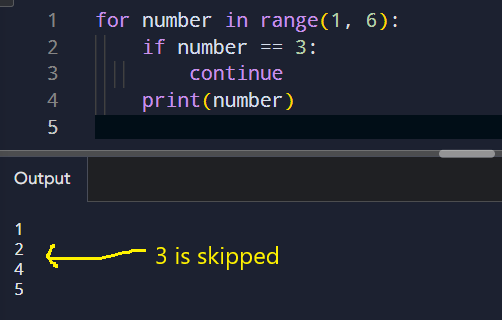
- continue skips the current round and moves to the next one.
They act like traffic signals inside your loop. They order loop to stop when needed, or move along without delay.
Example with break:
Example with continue
Summarizing loops
- Use a for loop when you’re working with a collection or a fixed number of steps. It’s clean, predictable, and ideal for moving through data one element at a time.
- Choose a while loop when repetition depends on a condition rather than a count. It keeps running as long as the rule holds true, which makes it perfect for input checks and ongoing processes.
- Reach for break when a loop has done its job early and needs to stop immediately.
- Use continue when you want to skip a single pass without ending the loop entirely.
Together, these tools give you precise control over repetition. You control when it runs, when it pauses, and when it stops.
Concluding
Loops show up in data processing, user input, file handling, animations, everything. Once you’re comfortable with them, your code becomes shorter and clearer. You stop thinking in single steps and learn to think more like a programmer.