If you’ve ever clicked a link or submitted a form online, you’ve already made an HTTP request. Maybe you didn’t realize it at the time, but that little action started a chain of communication between your browser and a web server. Let’s break it down.
So, what exactly is an HTTP request?
HTTP stands for HyperText Transfer Protocol. It’s the foundation of data communication on the web. Consider it as the language browsers use to ask servers for things like HTML pages, images, or data from an API.
When you visit a website, your browser sends an HTTP request to that site’s server, which then responds with the content you’re trying to access. It’s kind of like sending an SMS message and getting a reply.
Key Parts of an HTTP Request
Every HTTP request is made up of several parts, each with a specific purpose. Like sending a detailed letter: there’s who you’re writing to, what you’re saying, how you’re saying it, and a few extra notes.
1. Request Line
This is the first line of the request. It sets the tone and structure.
It includes:
- HTTP Method – What action you want to perform (e.g. GET, POST)
- URL or Path – The specific resource you’re requesting (e.g. /articles/12)
- HTTP Version – Typically HTTP/1.1 or HTTP/2
Example:

2. Headers
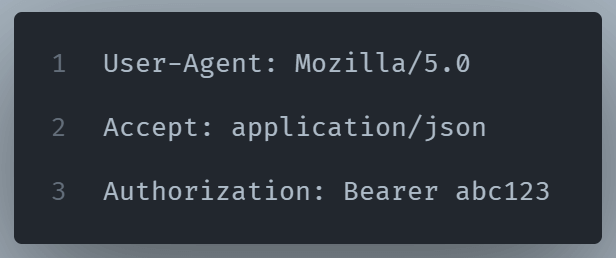
Headers carry metadata, that is extra information about the request. They help the server understand how to process the request, and what kind of response is expected.
Common headers include:
- Host: The domain name of the server
- User-Agent: Info about the browser or app making the request
- Accept: What kind of response is acceptable (e.g., JSON, HTML)
- Authorization: The Authorization header is necessary for security reasons. Servers use this to authenticate clients and authorize their access to requested resources. The process involves an authentication scheme (“Basic”, “Bearer”, etc.), and credentials encoded in various methods.
3. Query Parameters (for GET requests)
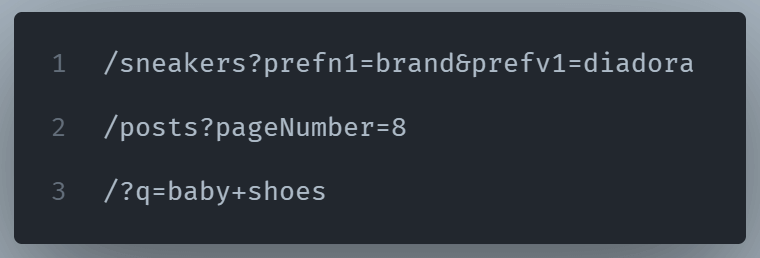
Query Parameters are displayed in a key-value pair form and they are added to the end of the URL after a question mark?.
They’re often used for filtering, searching, or pagination.
4. Body
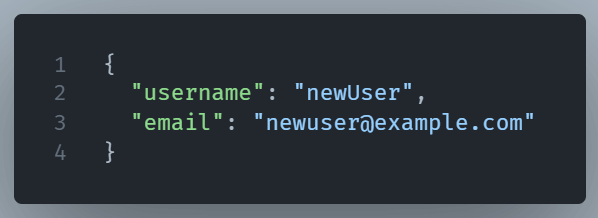
The request body includes the data you are sending to the server in JSON format.
This is common when submitting forms, creating records, or sending files.
Example JSON body:
Note: GET requests never have a body, but POST, PUT, and PATCH often do.
In what situations is an HTTP request useful?
Whether you’re building a weather app, a to-do list that syncs with the cloud, or just fetching comments for a blog post, you’ll likely need HTTP requests. These are vital for communicating with APIs, the technology behind most modern websites.
Wrapping it up
HTTP requests enable communication between web browsers (clients) and servers, allowing users to retrieve and send data, such as web pages, images, and videos.
They might seem complicated, but they’re fundamental to how the web works. Don’t worry about mastering it all at once, instead just start experimenting, and the pieces will click into place.