We have seen that in the request-response cycle; the server handles the request and sends back an HTTP response containing the requested content.
The server will either return the requested information or an error code detailing the backend issue whenever one occurs.
In order to verify whether a request was successful, failed due to an error, or even have been redirected, we need HTTP response status codes.
HTTP response status codes are three-digit numbers that indicate the result of a client’s request to a server.
HTTP Response Status Codes Categories
HTTP status codes are classified into five categories based on their first digit.
The following are some common response codes and their respective category.
1xx – Informational
These codes indicate that the server has received the request and is continuing to process it.
100 Continue: The server has received the initial part of the request and the client can proceed.
101 Switching Protocols: The server is switching protocols (e.g., from HTTP/1.1 to WebSocket).
103 Early Hints: Provides hints before the final response is sent.
2xx – Success
These codes indicate that the request was successfully processed.
200 OK: Request succeeded (standard response for successful GET/POST requests).
201 Created: A new resource was successfully created as a result of the request.
204 No Content: Request was successful, but there’s no response body.
3xx – Redirection
These indicate that further action is needed to complete the request.
301 Moved Permanently: The requested resource has been permanently moved to a new URL.
302 Found: The resource is temporarily at a different URL.
304 Not Modified: Indicates that the cached version of the resource is still valid.
4xx – Client Errors
These codes indicate that the request is incorrect or unauthorized.
400 Bad Request: The request is invalid (e.g., incorrect syntax).
401 Unauthorized: Authentication is required to access the resource.
403 Forbidden: The server understands the request but refuses to authorize it.
404 Not Found: The requested resource could not be found.
5xx – Server Errors
These codes indicate that the server failed to fulfill a valid request due to internal issues.
500 Internal Server Error: A generic error when something goes wrong on the server.
502 Bad Gateway: The server received an invalid response from an upstream server.
503 Service Unavailable: The server is temporarily down (e.g., maintenance or overload).
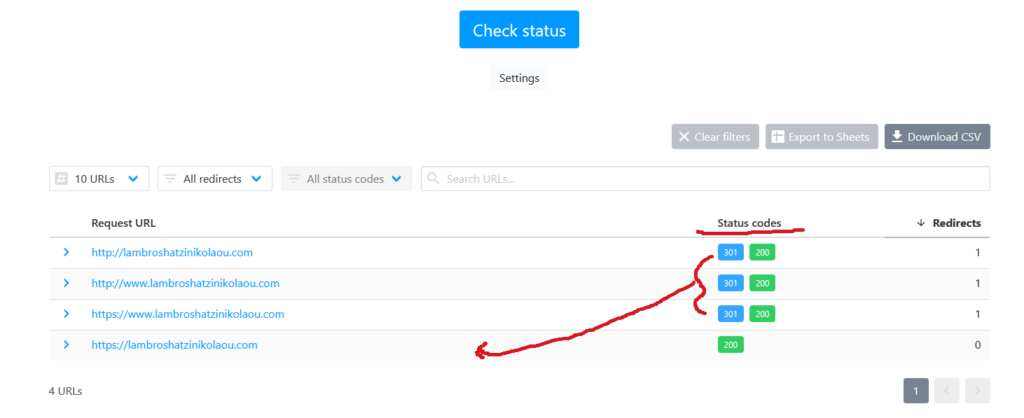
How to Check Our HTTP Status
We can quickly identify HTTP 4xx and 5xx error codes and broken URLs utilizingonline status checkers.
Conclusion
Status codes are important for debugging and optimizing client-server communication and are key to better SEO, debugging, and user experience.
They help us address 404 errors, slow 504 response times, and redirect issues (301/302).