A DNS (Domain Name System) server is an integral part of the internet.
Its job is to translate human-readable domain names (like www.google.com) into numerical IP addresses (like 142.250.190.46), which computers use to locate and communicate with each other.
Instead of memorizing IP addresses, users simply enter a domain name in their browser, and DNS handles the conversion behind the scenes.
How Does a DNS Server Work?
When we type a website address into a browser, the following steps take place:
1. DNS Query:
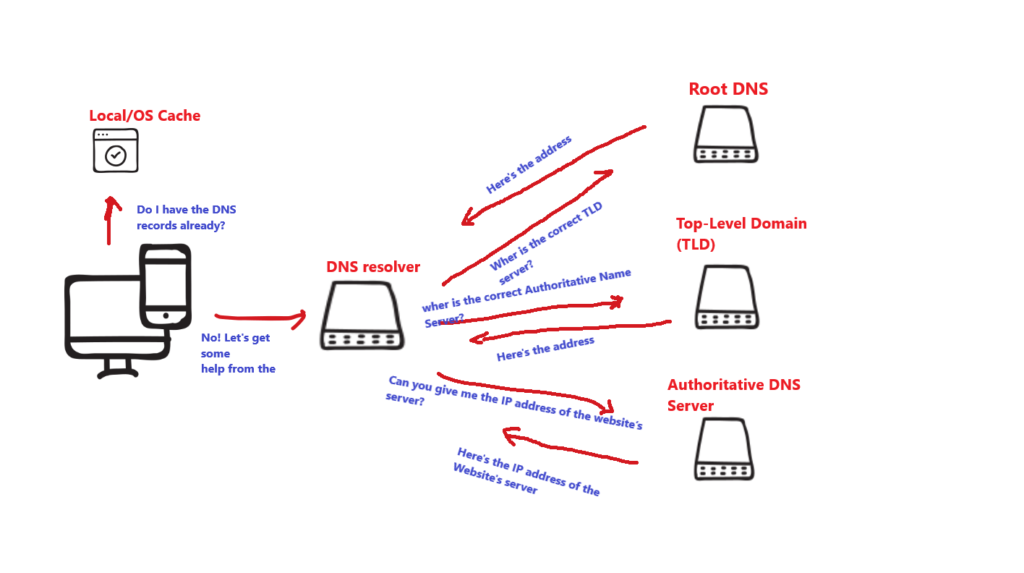
Our browser checks its local cache (stored from previous visits).
Modern web browsers have a built-in DNS cache that holds records for a certain time duration. Then if it can’t find the DNS record there it search in our operating system local DNS cache.
If it can’t find the IP address there, it sends a request to a DNS resolver (usually provided by your ISP or a third-party service like Google DNS or Cloudflare DNS).
DNS resolvers are servers with a specialized function.
It is the first server contacted by our browser; its job is to find the IP address by querying other DNS servers.
2. Recursive Lookup:
If the resolver doesn’t have the answer, it queries different DNS servers following a specific order.
The servers work together to find the correct domain’s IP address.
First, the resolver queries a Root DNS Server: This server’s job is to get the address of the correct Top-Level Domain (TLD) server.
For example, when we are looking up for the google.com IP, our request is directed to a .com TLD DNS Server.
Once the resolver gets the address of the right TLD DNS Serve, it makes a request to that server. The TLD DNS Server knows which Authoritative server has this specific domain’s IP so it points the resolver to that Authoritative Name Server.
Then, the resolver queries the right Authoritative DNS Server. This server provides the IP address of the website’s server.
3. Response & Connection:
Now the DNS resolver is able to return the IP address to the browser.
The browser then sends a request to that IP address to fetch the website’s content.
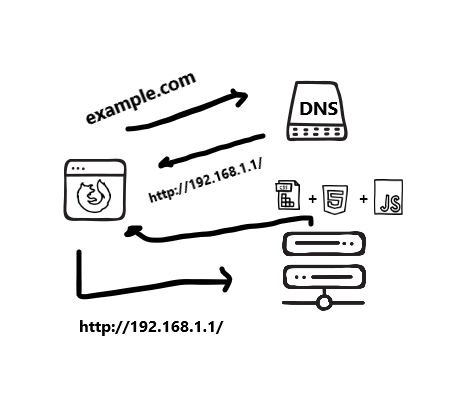
This process of translating a domain name into an IP address we just described is also known as DNS Lookup.